

It starts with a compliment.
“That AI thing you made is brilliant. Can the rest of us use it?”
You share the prompt, Custom GPT or Copilot agent. Within a week, people are asking which file to use, whether a result is correct, why yesterday's answer was different and whether it can send the finished work automatically.
Your useful shortcut now has a support queue. You are the queue.
Share an AI workflow by making its ordinary decisions visible: its exact purpose, approved inputs, checks, stop conditions, result owner and support route. Ask another person to run a normal and awkward case without coaching, transfer day-to-day decisions to the team using it and put an end date on creator support.
The goal is not zero questions. That would be a suspiciously quiet workplace.
The goal is to stop every predictable question returning to the person who built version one.
Why does sharing an AI prompt create so much support?
Because the prompt is normally the visible part of a private method.
The creator also knows:
- which source is current;
- what a good answer looks like;
- which errors the tool tends to make;
- what data must stay out;
- when the result needs approval;
- what the workflow must never do; and
- who can make the awkward decisions.
None of that travels when you paste the prompt into Teams with “give this a go”.
The next person can guess, produce weaker work quietly or ask you.
Most sensible people ask.
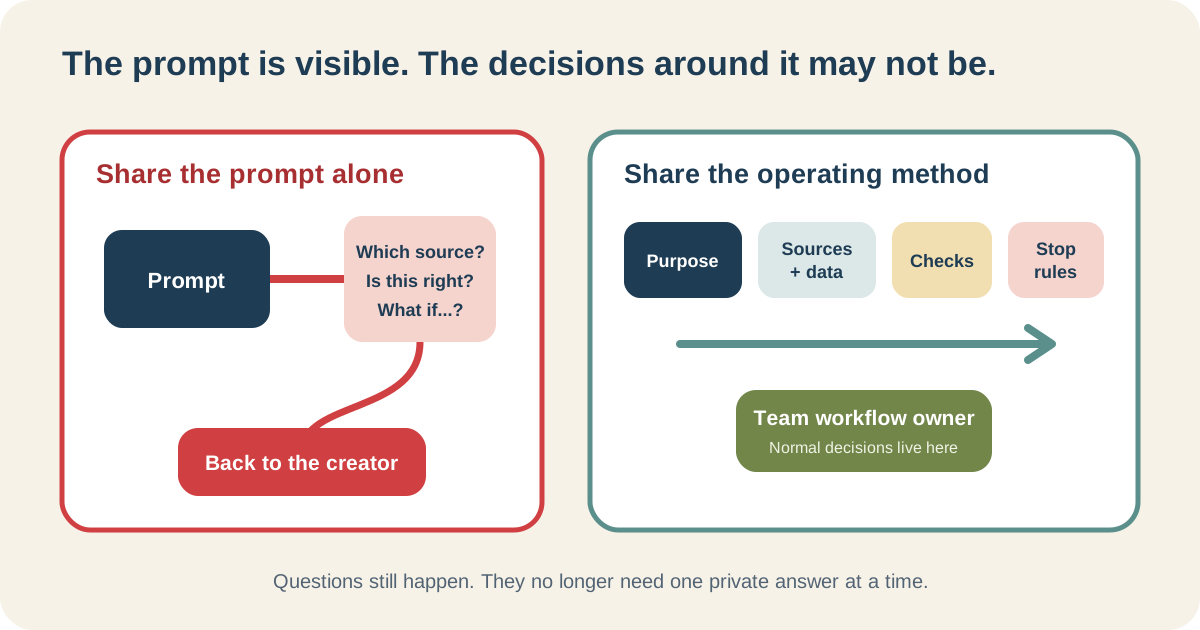
The support queue is often hidden operating knowledge becoming visible—not proof that colleagues are incapable.
What should I share with a Custom GPT, Copilot agent or AI prompt?
Not a manual. Not a 47-slide launch deck. One screen is a good constraint.
It needs seven things:
- Purpose and non-purpose
- Trigger and required input
- Approved sources and prohibited data
- The instruction or assistant link
- Acceptance checks
- Stop-and-ask conditions
- Result owner, workflow owner and review date
The prompt sits inside that card. It is not the card.
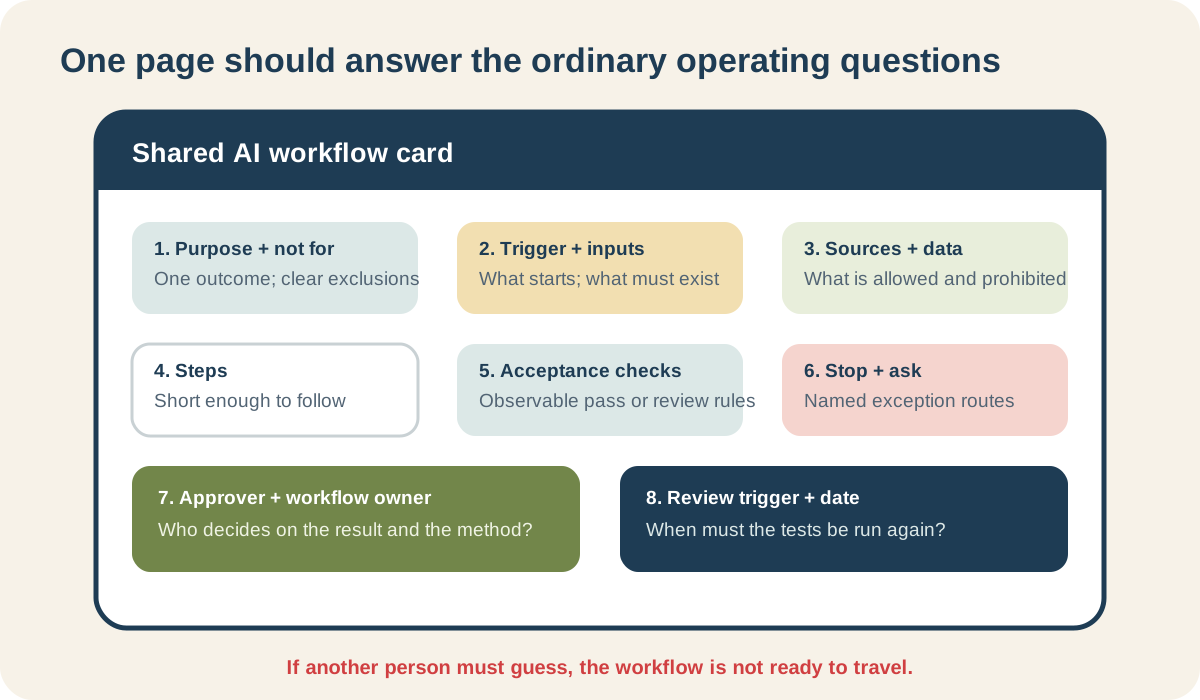
If the next person has to guess which document or decision you meant, the workflow has not travelled yet.
Show me a filled example
Suppose a marketing team wants to turn an approved webinar transcript into a draft recap.
| Card field | Filled example |
|---|---|
| Purpose | Draft five key points and a 120-word internal recap from one approved transcript |
| Not for | Publishing, attributed guest quotes, performance claims, social posts or filling gaps from the web |
| Trigger | Content editor marks the final transcript Approved for recap |
| Required input | Transcript link, webinar title, speakers and recording link |
| Approved source | The marked final transcript only |
| Data rule | Do not include audience names, chat comments or backstage notes |
| Checks | Every point is supported by the transcript; speakers are correct; no invented quote; recording link is present |
| Stop | Transcript is partial; speaker approval is unclear; two transcript versions exist; requested fact is absent |
| Result owner | Content editor approves or rejects each recap |
| Workflow owner | Marketing operations owner reviews failures and changes |
| Review trigger | After ten recaps, any serious failure, source change or new audience |
There is still a prompt. It might say:
Using only this approved transcript, draft five factual takeaways and a 120-word internal recap. Do not create quotations. If a requested fact is absent, flag it. Do not publish or create social copy.
The value is not the prose of that instruction. The value is that the card answers the questions people would otherwise send back to its author.
What is the transfer test?
Give a capable colleague the card and two examples:
- one normal transcript; and
- one awkward transcript with a missing ending or an unapproved guest quote.
Then go quiet.
Watch what happens:
- Can they locate the right source?
- Do they know what should never enter the tool?
- Can they apply every check?
- Do they stop at the awkward case?
- Do they know who approves the recap?
- Where do they record the failure?
Afterwards, ask:
- What did you have to guess?
- What would you have done if I was away?
- Which part felt unsafe, unclear or unnecessarily annoying?
Repair the workflow before blaming the user.
If they still need the creator to recognise whether the answer is acceptable, decide whether that judgement can be taught. If it cannot, the creator or another experienced reviewer belongs in the ongoing process.
At Collab365, Helen is my most useful transfer test. I can become blind to steps because I built them. If I have to sit beside her translating what a button, file or instruction really means—or she tells me it is too confusing—the handover is not finished. That reaction saves us from shipping my private knowledge as somebody else's support problem.
How do I stop becoming permanent AI support?
Set a support boundary before the trial starts.
Here is wording you can steal:
For the next two weeks, record questions and failed cases in the shared log. Priya owns day-to-day recap decisions. I will review the log on Tuesday and Friday. On day 14 we will decide whether the workflow is ready, needs repair or should stop. Please do not send workflow questions in private messages because the answer needs to be visible to everybody using it.
That is more generous than answering the same private message twelve times.
I would rather answer ten awkward questions in one visible two-week trial than answer the same question privately for the next year.
The shared log only needs:
| Date and case | What failed or was unclear? | Decision and owner | Change made |
|---|---|---|---|
Do not use the log to make users prove they followed instructions. Use it to find recurring ambiguity, bad source design and new use cases trying to sneak through the side door.
Where should different questions go?
The workflow creator should not become a forwarding address for the entire organisation.
| Question or failure | Sensible route |
|---|---|
| Is this particular result accurate enough to use? | Person accountable for that work result |
| Which source or definition is approved? | Workflow or process owner |
| May this data go into the AI product? | Existing policy, privacy or security owner |
| Why can I not open the assistant or source? | IT or product administrator |
| The product is failing or unavailable | Existing support or vendor route |
| Can we use it for a different task or audience? | Treat as a new use case; reassess scope and tests |
| Should the workflow be paused or retired? | Named process owner |
NIST's AI Risk Management Framework calls for defined roles, communication lines and differentiated human-oversight responsibilities.
You do not need a committee for a webinar recap. You do need to stop “ask whoever built the prompt” becoming the operating model.
What if people keep using it for the wrong job?
Treat repeated misuse as design evidence.
Maybe the name is too broad. Perhaps the assistant opens with an enormous empty text box that appears to invite anything. The “not for” line may be hidden. Or the team has a nearby problem nobody has solved.
Try:
- renaming it after the exact output;
- placing one permitted and one prohibited example beside the start;
- removing tools or actions it does not need;
- putting the stop rule next to the input;
- restricting the trial audience; and
- creating a separate route for the adjacent task.
“Webinar recap drafter” is a better name than “Marketing AI Assistant”. The latter will be asked to write a press release, analyse the pipeline and fix the printer before lunch.
When should I not share the workflow?
Do not widen it when:
- the data or product approval is uncertain;
- the creator is the only person who can spot a serious error;
- awkward and failure cases have not been tested;
- users lack the authority needed by the stop rule;
- an unchecked result can trigger a consequential action;
- connected sources expose more than the audience should see;
- nobody will own ordinary decisions; or
- expected support costs more than the task saves.
Keep it personal, narrow it or stop.
A shared assistant is not automatically the reward for a good prompt. Use the chat, custom assistant or automation scorecard to choose from the work rather than the feature list.
Make it survive your day off
Before sharing, hide the prompt and look only at the operating card.
Could a colleague identify the input, source, checks, stop rule, approver and support route while you are unavailable?
If not, fix those gaps and run the transfer test.
The Build My First Repeatable AI Workflow Board helps you make the task, boundary, checks and second-person attempt visible before you widen access.
It cannot appoint an owner inside your organisation or guarantee that nobody will ask a question. It can help you discover whether you have a shareable workflow or a clever personal trick still powered by you.
Can I share just the Custom GPT or assistant link?
You can, but the link does not explain approved inputs, checks, stop rules, result ownership or support. Put those beside it.
Who owns an AI-generated result?
Name the person accountable for reviewing that piece of work. Separately name the process owner who can change, pause or retire the workflow.
Does good documentation make an AI workflow safe?
No. It makes the intended route inspectable. Safety also depends on task choice, evidence, permissions, testing, reviewer ability, consequences and ongoing monitoring.