
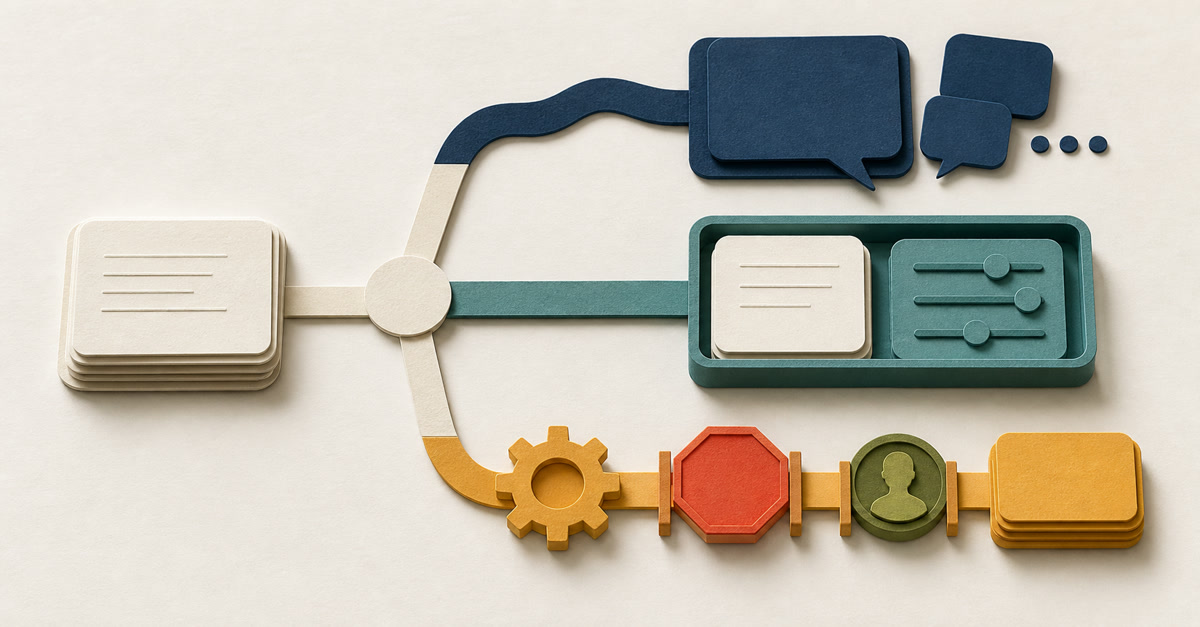
You open ChatGPT, Claude, Grok or Copilot because you need help with an email, a report or some meeting notes.
It does a decent job.
Then the menus start talking about assistants, agents and automations.
That is usually the point where a simple job starts to feel complicated.
So here is the plain answer.
Use AI chat when you want help thinking or writing. Save the setup as a Project or custom assistant when you keep repeating the same instructions. Use an AI agent when the AI needs to use tools and work through several steps. Add automation when the job should start or move on because something has happened.
Choose the simplest option that safely does the job.
The 30-second answer
| Choice | What it means | When it is useful |
|---|---|---|
| AI chat | You open the chat, explain the job and check the reply | The job is new, unusual or different each time |
| Custom assistant / saved setup | Your usual instructions and reference information are saved for reuse | You or your team keep doing the same job in the same way |
| AI agent | AI works through several steps and uses approved tools to complete a job | The route may change depending on what the AI finds |
| Automation | Software notices that something has happened and starts or moves the work along | The trigger and route are settled and there is a safe way to catch problems |
An agent or automation is not automatically better. Both can carry a mistake further before you see it.
My usual advice is to start in chat. Move on only when repeating the same setup has become a genuine nuisance.
What do these words mean?
ChatGPT, Claude, Grok and Copilot are product names. They can all be used for a conversation, but the words below describe how you are using the AI and how much freedom it has.
AI chat is what most people already know. You type a question or give it a small job, and it replies in the conversation.
A custom assistant is my general name for a saved chat setup. It can hold your usual instructions, examples, documents and rules, so you do not have to explain everything from the beginning each time.
An AI agent is given an outcome rather than just one question. It can choose its next step, use approved tools, look at what happened and adjust its plan. For example, it might open a meeting transcript, make a list of actions and save a draft in the right folder.
Automation starts or moves work when a known event occurs. For example, it might notice that a meeting transcript is ready, start the agent and tell the meeting chair when the draft needs checking. An automation can use an agent, ordinary software rules or both.
What do I click in ChatGPT or Claude?
Custom assistant is not a button you will see in both products. Look for one of these:
| Product | What to look for | What you would do for the meeting example |
|---|---|---|
| ChatGPT Project | New project in the sidebar, then Project settings for its instructions | Create a project called Meeting Actions, save the action-list rules, add your blank template as a project source and start each transcript in a new project chat |
| Custom GPT in ChatGPT | GPTs, then Create, if your managed workspace allows it | Create Meeting Actions Checker, put the rules in Instructions, add the template under Knowledge, test it and share it only with the intended people |
| Claude Project | Projects, then New Project and Set project instructions | Create Meeting Actions, save the rules as project instructions, add the template to project knowledge and start each transcript in a new chat inside that project |
A ChatGPT Project is the simplest current example for most personal accounts. Claude Projects are also available on free accounts. At the time of this update, creating a new custom GPT is limited to ChatGPT Business, Enterprise and Edu workspaces where the administrator permits it.
For this meeting job, the saved instruction could begin:
Use only the transcript added to this chat. List each action, possible owner, due date and the words that support it. If a name or date is missing, write needs checking. Do not assign or send anything.
You still add the latest transcript and check the answer. The saved setup has remembered the briefing; it has not taken control of the work.
Some custom GPTs can also use connected tools or actions. Once you allow that, ask the stricter agent questions: what can it read, what can it change and where must it ask before acting?
Companies do not always use these labels in the same way. Ignore the name for a moment and ask four questions:
- What can it read?
- Which tools can it use, and what can it change or send?
- Does a person start it, or does an event start it automatically?
- Who checks what it has done?
If the difference between getting advice from AI and asking it to finish a piece of work is still unclear, the AI for Work guide explains it without assuming you are technical.
What are AI agents called in real products?
The product names change quickly. These are the main names you may see at the moment:
| Name you may see | What it means in this guide |
|---|---|
| ChatGPT Chat | OpenAI's ordinary chat for questions, ideas and quick help |
| ChatGPT Work | OpenAI's general work agent for longer jobs such as research, reports, documents and spreadsheets |
| Codex | OpenAI's agent for software development and technical work |
| Claude Chat | Anthropic's ordinary chat |
| Claude Cowork | Anthropic's general work agent for jobs involving several steps, files or tools |
| Claude Code | Anthropic's agent for software development and technical work |
| Grok | xAI's chat, search and reasoning product; its Multi-agent mode uses several agents to tackle parts of a difficult question |
| Copilot Studio agents | Microsoft's name for agents you build for a particular business job; Power Automate is still used for fixed triggers and workflows |
Codex has not simply been renamed ChatGPT Work. OpenAI still lists both: Work for broader knowledge work, and Codex for software and technical work.
The names became blurred because some everyday jobs once demonstrated in Codex can now be done with ChatGPT Work.
Do not choose by the name alone. Check whether you are starting a conversation, handing over a multi-step job or setting up something that will run when an event happens.
How we actually split the work at Collab365
This article is a useful example. I used chat to work through the confusing product names, the missing AI agent category and the parts that still sounded too technical. I stayed in the conversation because the judgement and wording were still moving.
Then I used Codex on the real Collab365 files. It changed the article, added the AI for Work link, repaired the shared table style and checked the page at desktop and phone widths. A chat answer could suggest better wording. It could not prove that the live page was readable.
Our practical split looks like this:
| Product shape | What we use it for |
|---|---|
| ChatGPT, Claude or Grok chat | Questions, disagreements, rough thinking and first drafts while one of us stays in the conversation |
| ChatGPT Work or Claude Cowork | A longer non-code job involving several files, research steps or a finished document, once the inputs and finish line are clear |
| Codex or Claude Code | Work that needs to inspect, change and test the actual website, codebase or content files |
| Automation | A settled repeated step with a known trigger, failure route and named person who checks the result |
We do not use every product merely because it exists. If a job can stay in chat, it stays in chat. If an agent can prepare a draft without publishing it, we keep that approval boundary.
One job, done four ways
Imagine you have the written transcript from a meeting. You want a draft list showing five things:
- what needs doing;
- who might be responsible;
- when it is due;
- the exact words in the transcript that support it; and
- needs checking when anything is missing.
The AI must not invent a name or a date. Nothing should be assigned to anybody until the person who ran the meeting has checked it.
Option 1: use AI chat
The meeting chair opens the approved AI chat, adds the transcript and asks for the draft list.
They compare every item with the transcript and decide what was really agreed.
This is a good choice when meetings differ and understanding the people in the room matters.
- You need: one clear request and a checking list.
- The good part: it is easy to correct the AI as you go.
- Watch out for: different people may ask in different ways and get different results.
Option 2: save the setup
The meeting chair uses the ChatGPT Project, custom GPT or Claude Project described above. It keeps the same rules for every meeting: the format, the difference between an agreed action and general discussion, and the rule against making up names or dates.
The user still adds the latest transcript. The meeting chair still checks the result.
This can help when several people need to do the same job and keep making the same setup mistakes.
- You need: saved instructions, examples, approved information and a checking list.
- The good part: everyone starts with the same rules.
- Watch out for: one bad saved rule can affect every user.
Option 3: use an AI agent
The meeting chair starts the agent and points it to the transcript.
The agent opens the file, finds the actions, checks whether names and dates are present and saves a draft in the approved review folder. If it cannot find enough evidence, it marks the item needs checking.
It may choose several steps, but it is not allowed to assign work or send the final list.
- You need: a clear outcome, narrow access to the right tools, stopping rules and a checking list.
- The good part: the agent can do more of the legwork without every step being written in advance.
- Watch out for: it may choose a poor route or misunderstand what it finds.
Option 4: add automation
When a meeting transcript is marked as ready, software starts the agent. The draft goes into a place where the meeting chair can check it.
Only an approved list is posted. If information is missing, the process stops and asks for help.
This makes sense only when the transcript always arrives in a known place, the chair knows where to check it and somebody is responsible when it fails.
- You need: access to the right systems, clear error messages, an approval step and a named owner.
- The good part: people no longer have to move the transcript and draft around by hand.
- Watch out for: a poor result can move through several systems before anybody notices.
A simple way to choose
Use this table for one real job. Do not try to answer it for “AI across the whole business”.
| If you need... | Start with... |
|---|---|
| Help thinking, writing or understanding something while you stay involved | AI chat |
| The same instructions, examples or reference information every time | A custom assistant or saved Project |
| AI to use tools, make a plan and change course when needed | An AI agent |
| The job to start or move on when a known event happens | Automation |
You may eventually combine them. An automation could start an agent that follows saved instructions.
If you cannot say what it may read, change or send, keep the job in chat for now.
That is not failure. It simply tells you what needs sorting out first.
When is chat enough?
Keep the job in chat when:
- you are still working out the best way to do it;
- every case is different;
- you want advice or a draft rather than an action;
- your personal judgement is the important part; or
- you need to see every step because a mistake would matter.
Preparing for a difficult conversation is a good example. AI can help you organise your thoughts, but the history between two people changes what a sensible answer looks like.
Chat is also a good place to practise. After you have done the same job a few times, you will know which information matters and where the AI tends to go wrong.
When would a saved assistant setup help?
A ChatGPT Project, custom GPT or Claude Project is worth considering when you keep typing the same instructions into new chats.
Before you save one, write down:
- the one job it should do;
- the things it must never do;
- which information it may use;
- what the answer should look like;
- how a person will check it;
- when it must stop and ask for help; and
- who is responsible for keeping it up to date.
Saving the instructions does not make the answers correct.
Microsoft's Copilot Studio guidance says generated answers can vary and may contain mistakes. In ordinary English, you can ask almost the same question twice and get two different answers.
It still needs checking.
When would an AI agent help?
An agent may help when the AI needs to do more than answer one question.
It might need to:
- open information from more than one approved place;
- decide which step to take next;
- use a tool to create or update something;
- check the result of that action; and
- stop or change course when something is missing.
That extra freedom is what makes an agent useful. It is also what makes clear limits important.
Start with the least access it needs. Make it ask before sending a message, spending money, deleting anything or publishing under somebody's name.
Anthropic gives a useful plain distinction in its guidance on agents: a fixed workflow follows routes decided in advance, while an agent decides how to use its tools as the job unfolds.
When does automation make sense?
Automation means software starts or continues the job without waiting for you to open a chat.
Before you build it, answer these eight questions:
- What exactly starts the job?
- What information is allowed to enter?
- Which steps are simple, fixed rules?
- What may the software create, change, send or delete?
- What must wait for a person's approval?
- What happens when information is missing, late or sent twice?
- Who is told when it fails?
- Who can stop it, fix it and start it again?
Microsoft shows an example of using an AI Builder prompt in Power Automate. A person reviews the generated text, and the process continues only after approval.
Approval only helps when the reviewer can see the evidence, has time to check it and is allowed to say no.
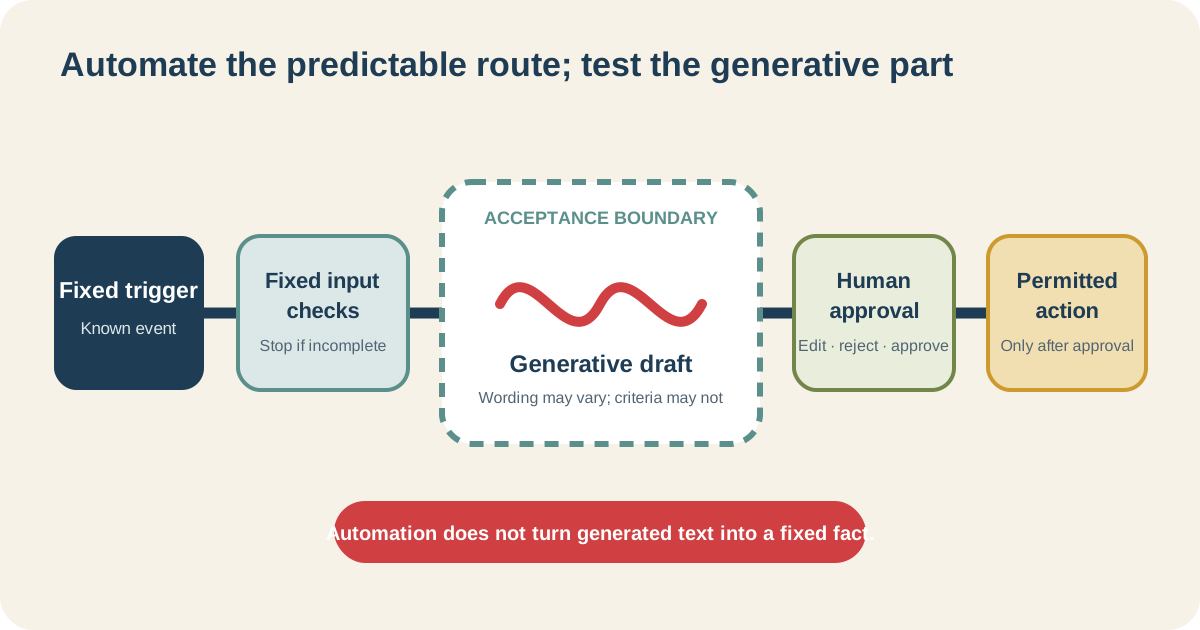
Keep the simple steps as simple rules. Use AI only where its flexibility is useful, and check the result before anything important happens.
What should not be casually automated?
Be especially careful when a decision could affect:
- somebody's job;
- health or care;
- money, credit or insurance;
- legal rights;
- physical safety;
- a vulnerable person;
- words published under somebody else's name; or
- important files or systems that are hard to restore.
Bring in the person responsible for policy, security, legal matters or the work itself before you go any further.
Sometimes the right answer is to let AI prepare a small draft while a person remains in charge.
Sometimes the right answer is not to use AI.
Start with one small job
Choose one repeated job where a mistake would be easy to spot and put right.
Try it in chat more than once. Write down what you gave the AI, what it produced and what you had to correct.
If you keep copying the same instructions, a ChatGPT Project, custom GPT or Claude Project may remove that repetition.
If the AI needs to work through several steps or use tools, try an agent with narrow access and approval points. If the job also needs to start or move on by itself, then look at automation.
Take one step at a time.
Before sharing an assistant with other people, read how to avoid becoming its permanent helpdesk. If the answers keep changing, try the five-run consistency check.
The Build My First Repeatable AI Workflow Board walks you through one job and helps you decide whether to keep it in chat, improve it, share it, automate part of it or leave it with a person.
It does not choose a product for you. It helps you understand the job before you spend time building anything.
Is a custom assistant just a saved prompt?
It can be. It may also include reference information, examples and access to a small number of tools. It still needs clear limits, testing and a person responsible for it.
Should every useful prompt become an assistant?
No. Save one when you repeat the same job and the saved setup removes a real nuisance.
Are ChatGPT, Claude and Grok AI agents?
They are product names. You can use them for an ordinary chat, and some of their features can also use tools or carry out several steps. Check what the part you are using can actually read and do.
Is an AI agent just another name for automation?
No. An agent chooses some of its steps as it works. Automation usually starts or moves a job along using rules and triggers decided in advance. They can be used together.
Does automation make AI answers consistent?
No. It can make the steps around the AI consistent, but the AI's wording and decisions can still change. Keep the checking step.