
You use the same prompt twice.
The first answer is sharp. The second wanders. The third drops a detail you needed and introduces one you definitely did not supply.
If you have spent ten minutes adding “please be consistent”, you are in good company. Unfortunately, the instruction is now merely more cross.
Generative AI gives different answers because it generates a likely response rather than retrieving one fixed sentence. Conversation history, tiny input changes, retrieved sources, model choice and product updates can also alter the result. The useful goal is not identical prose; it is stable facts, required content, boundaries and actions.
This article includes a five-run experiment you can copy. It will show you exactly which differences matter in your tool, rather than asking you to take “AI is non-deterministic” on faith.
Why can the exact same AI prompt produce different results?
The visible prompt is only part of what produced the answer.
Four things matter:
- Generation varies. A language model can choose among several plausible next words, sentences and structures.
- The conversation varies. Earlier questions, files, corrections and instructions may influence the next answer.
- The evidence varies. Search, retrieval or connected knowledge may return different passages, or the underlying file may have changed.
- The product varies. Providers update models, safety behaviour, system instructions and surrounding services.
Microsoft's Copilot Studio generative-answers FAQ says plainly that answers are not deterministic, near-identical questions can produce different responses and previous conversation context can affect them.
That is not an excuse for unreliable work. It is the design condition you have to work with.
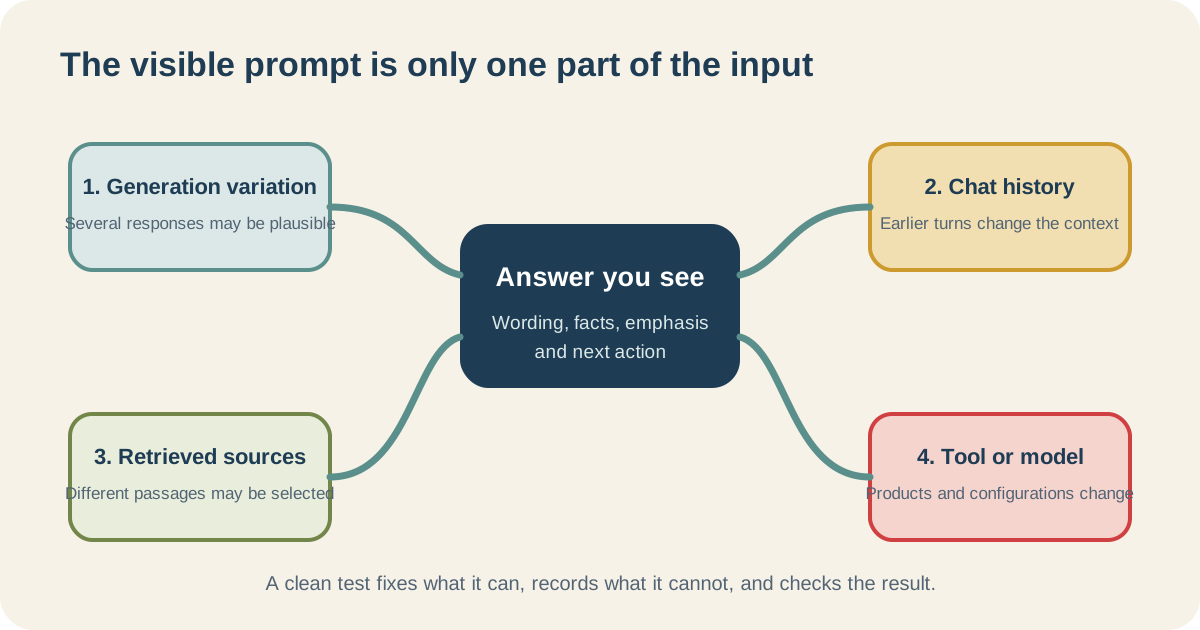
Copying the last message does not necessarily reproduce everything the system saw.
Try this five-run AI consistency experiment
Use an AI tool your organisation permits. Start a fresh conversation for every run. Do not add friendly follow-up instructions when one answer annoys you.
Use this source note:
Facilities notice — approved facts
Lift B will be unavailable on Tuesday 8 September from 09:00 until 12:00 for inspection. Staff should use Lift A. Deliveries over two metres long must use the loading bay. Questions go to Facilities on extension 204. Do not describe the inspection as a fault or emergency.
Use this prompt:
Using only the approved facts below, draft a 60–80 word internal notice. Include the affected lift, date, exact times, alternative route, large-delivery instruction and contact extension. Do not add a cause, apology, safety claim or urgency that the source does not state.
Run it five times. For each answer, record:
| Check | Run 1 | Run 2 | Run 3 | Run 4 | Run 5 |
|---|---|---|---|---|---|
| Says Lift B | |||||
| Says Tuesday 8 September | |||||
| Preserves 09:00–12:00 | |||||
| Directs staff to Lift A | |||||
| Routes large deliveries to loading bay | |||||
| Includes extension 204 | |||||
| Adds no invented cause, danger or urgency | |||||
| Word count is 60–80 |
Then compare the openings, order and tone.
You will probably see different sentences. You may see the same facts arranged differently. Those are observations, not automatic failures.
If a run changes the lift, time, delivery route or reason for the inspection, you have found meaningful drift.
This is a reproducible exercise, not a claim that every product will fail in a particular way. Save the five outputs with the date and tool information the product shows. They become your evidence.
Use the drift ladder: wording at the bottom, action at the top
Not every difference deserves the same reaction.
| Level | What changed? | Example | Response |
|---|---|---|---|
| 1. Wording | Sentence choice or punctuation | “Use Lift A” becomes “Please use Lift A” | Usually acceptable |
| 2. Structure | Order, headings or layout | Contact details move to the end | Accept if the format still works |
| 3. Coverage | A required point appears or disappears | Loading-bay instruction is omitted | Review or fail against the checklist |
| 4. Evidence | A source fact changes or is invented | 09:00 becomes 10:00 | Fail |
| 5. Decision | The output changes what somebody is told to decide | Routine inspection is described as an emergency | Stop and investigate |
| 6. Action | The tool does something outside permission | Publishes or sends the notice | Stop; review permissions and workflow design |
Most teams waste energy at levels 1 and 2 because those differences are easy to see.
Levels 3–6 are where the work gets expensive.
I care very little if the verb moves. I care a great deal if Tuesday becomes Wednesday or a draft quietly becomes a published action.
That is how we review AI-assisted copy at Collab365. I do not expect two drafts to use the same sentences. I do expect the product name, date, source link, boundary and next step to survive. If a smoother draft renames a product, drops the evidence or turns a cautious statement into a promise, it fails.
What should stay fixed when AI wording changes?
Draw an acceptance envelope around the output: the range of different answers you will accept.
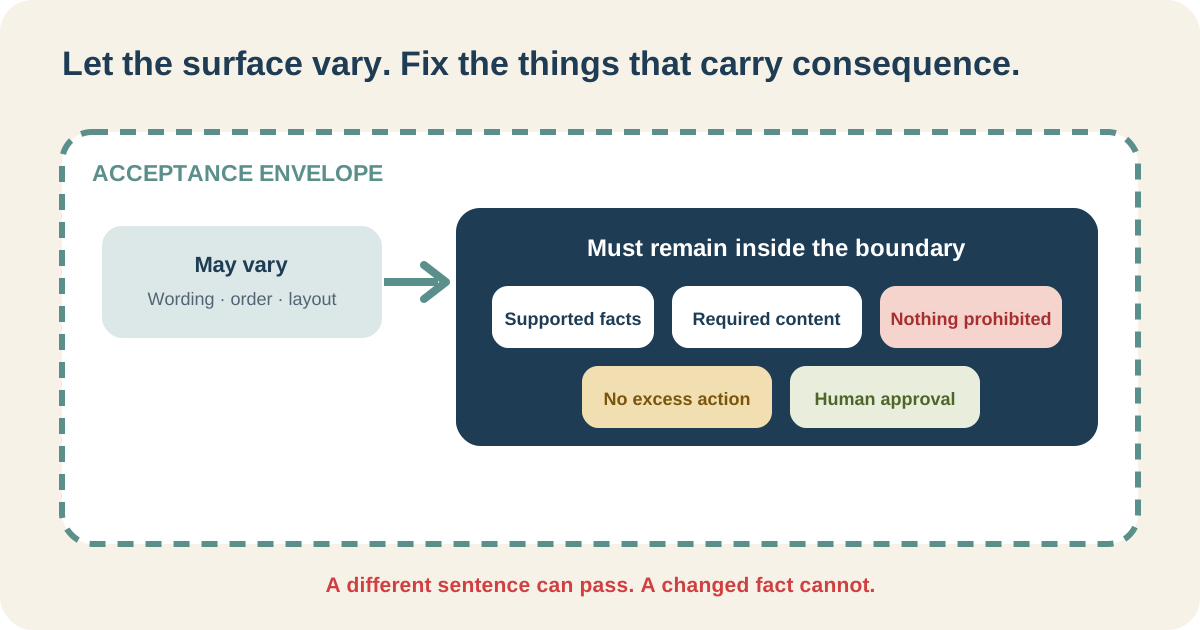
Let language move where it is allowed to move. Nail down the parts that change the work.
For an ordinary drafting task, keep these stable:
- facts match an authorised source;
- required fields are present;
- prohibited content stays out;
- the action boundary is not crossed; and
- a named person can review and approve the result.
If wording has been legally approved or must be reproduced exactly, do not invite a generative model to improve it. Store and insert the approved text with an ordinary rule.
Generative AI does not need to generate everything.
How can I make AI answers more consistent?
Start with the boring controls. They work surprisingly hard.
Use fresh conversations when comparing runs
A long conversation contains invisible baggage from earlier messages. For a clean comparison, start fresh and keep the input, files and instruction fixed.
If earlier context is deliberately part of the workflow, preserve and test that context too.
Make the job narrower
“Review this document” has no obvious finish line.
“List every delivery date, cite its section and flag conflicts” tells the tool what to find and gives the reviewer something observable to check.
Name the source boundary
Use only the attached approved brief. If a required fact is absent or conflicting, say so. Do not fill the gap from general knowledge.
That instruction is not a guarantee. It makes the intended behaviour testable.
Specify the output contract
Name the fields, length, format and fixed language that matter.
Structured output does not make a weak fact true. It does make an omission much easier to spot.
Test the rule, not your favourite paragraph
Do not compare every answer with the first one as if it were holy text.
Compare all of them with the same source and acceptance checks. The first answer may be the one that is wrong.
Can temperature make AI completely deterministic?
Some developer tools expose settings that reduce randomness. They can reduce variation, but they do not repair an ambiguous task, changing evidence or missing rule. Platform and backend changes can still matter.
Most workplace users should not begin by hunting for a temperature control they may not have.
Begin with fixed evidence, a narrow task and checks another person can apply.
If the correct output is a calculation, fixed phrase or database value, use a formula, stored text or query for that part. Ordinary software is allowed to keep its job.
What if the answers change after the workflow is shared?
Assume they will eventually.
Keep:
- the approved source set;
- the instructions;
- the acceptance checks;
- the five-run results;
- known failure cases;
- the available tool and model information;
- the owner; and
- the review trigger.
Rerun the fixed cases when a source, model, policy, instruction or audience changes.
Microsoft's Foundry observability guidance separates evaluation before use from monitoring after deployment. Your workflow may be one prompt and a spreadsheet, but “we checked it once” remains a poor maintenance plan.
Run the experiment before rewriting the prompt again
If different answers are causing real rework, stop editing by instinct.
Run the five copies. Mark the drift level. Add one missing-input case and one conflicting-source case. You will then know whether you have harmless variation, an unclear contract or a workflow that fails when the evidence gets awkward.
For a wider reliability test, use the complete seven-case test pack.
The Build My First Repeatable AI Workflow Board helps you capture the task, sources, acceptance boundary and test record before deciding whether it should stay in chat or become something more structured.
The aim is not one sacred paragraph forever. It is a process that notices when variation becomes drift.
Why does a fresh chat still give a different answer?
A fresh chat removes earlier conversation history. It does not remove generative variation, source retrieval differences, model settings or product changes.
Are two different answers both correct?
They can be. Check both against the same authorised facts, required content, prohibited content, action boundary and approval rule.
Is “be consistent” a useful prompt instruction?
It is too vague on its own. Replace it with observable requirements such as preserving exact dates, including named fields and stopping when evidence is missing.