

When people are worried about AI changing their job, the advice is usually enormous.
Learn AI. Reinvent yourself. Build an agent. Become a leader. Keep up with tools that change before you have finished the tutorial.
That is a miserable to-do list for somebody who already has a job to do.
Here is a smaller answer.
If AI is changing your job, spend the next 30 days investigating one real, low-consequence task. Record how it works now, set a clear boundary for AI, test ordinary and difficult cases, and count the checking as work. Finish with a keep, change or stop decision, not a promise that you have secured your career.
I learnt this on a real job, not a 30-day challenge. When I used AI to rebuild the Priorslee Motor Spares website, the visible build took one working day. That sounds like a lovely AI demo line. The less glamorous truth is that the owner supplied the facts, I chose the structure, checked the claims, tested the enquiry routes and inspected the live site.
That one-day result belongs to one tightly bounded project. It is not a promise about every website. It did teach us something we now use at Collab365: start with a real job, and count the checks as part of the job.
What should I do first if AI is changing my job?
Work out which of these two positions you are in.
| What you know today | Your next move |
|---|---|
| “I feel exposed, but I do not know which parts of my work are changing” | See which parts of my job are changing in Futureproof, then compare the result with your last fortnight |
| “I can name one recurring task I want to improve” | Use the 30-day experiment below |
| “I already tested the task, but it only works when I am there” | Build one visible, repeatable example |
| “The task is high-consequence, regulated or blocked by policy” | Take it to the accountable manager, security, legal, compliance, union or professional body before testing |
Do not force yourself into the Board route because you are frightened. It is for somebody who has one suitable task. Futureproof is the better first stop when the task is still unclear.
What can 30 days honestly achieve?
A month is enough to learn something useful about one task in one setting.
It is not enough to prove that AI will protect your job, that every colleague should use the same method, or that the next model update will behave identically.
The month has four jobs: map, choose, test and decide.
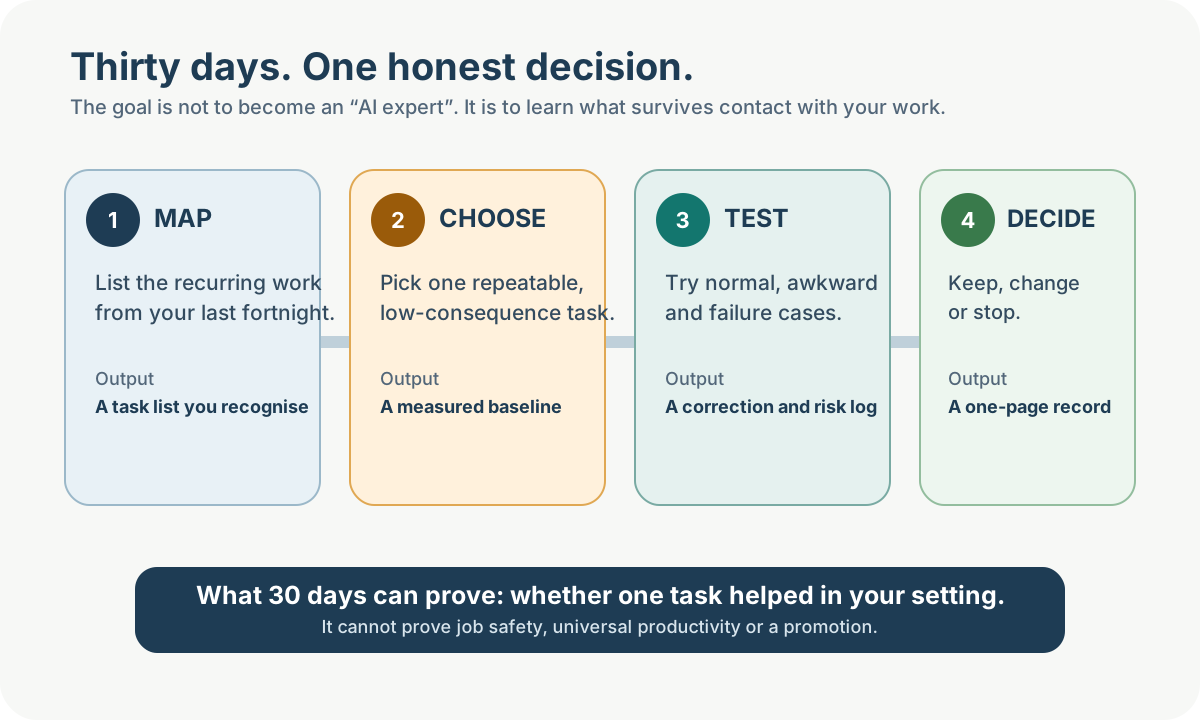
The useful finish line is a decision record. “Stop” is a valid result if the checking effort or risk outweighs the benefit.
Week 1: map the work you really do
Do not start by opening an AI tool. Start with your calendar, sent messages, recent files and task list.
Write down the recurring work from the last ten working days. Keep each item small enough to test:
- combine five project updates into the Friday report;
- turn meeting notes into a first draft of actions;
- compare a document with an agreed checklist;
- classify incoming requests for a person to review;
- draft a reply using approved public information.
Avoid labels such as “manage projects” or “do marketing”. Those contain dozens of tasks with different risks.
For each item, note the trigger, inputs, output, frequency, person who approves it and what happens if it is wrong.
If the role itself is hard to unpack, use Futureproof's task-level occupation pages as a starting list. Its published method is explicit that exposure is not a probability of losing your job. Then correct the occupation model with what your own week contains.
Week 1 output
Finish the week with a list you recognise, not a list a consultant thinks somebody with your title ought to do.
Week 2: choose one task and establish the baseline
Your first experiment should be boring enough to inspect.
Microsoft's current guidance on deciding when Copilot or an agent is the right tool asks teams to consider repeatability, impact, error detectability and time sensitivity. The tool may be different, but those are sensible questions for any workplace AI test.
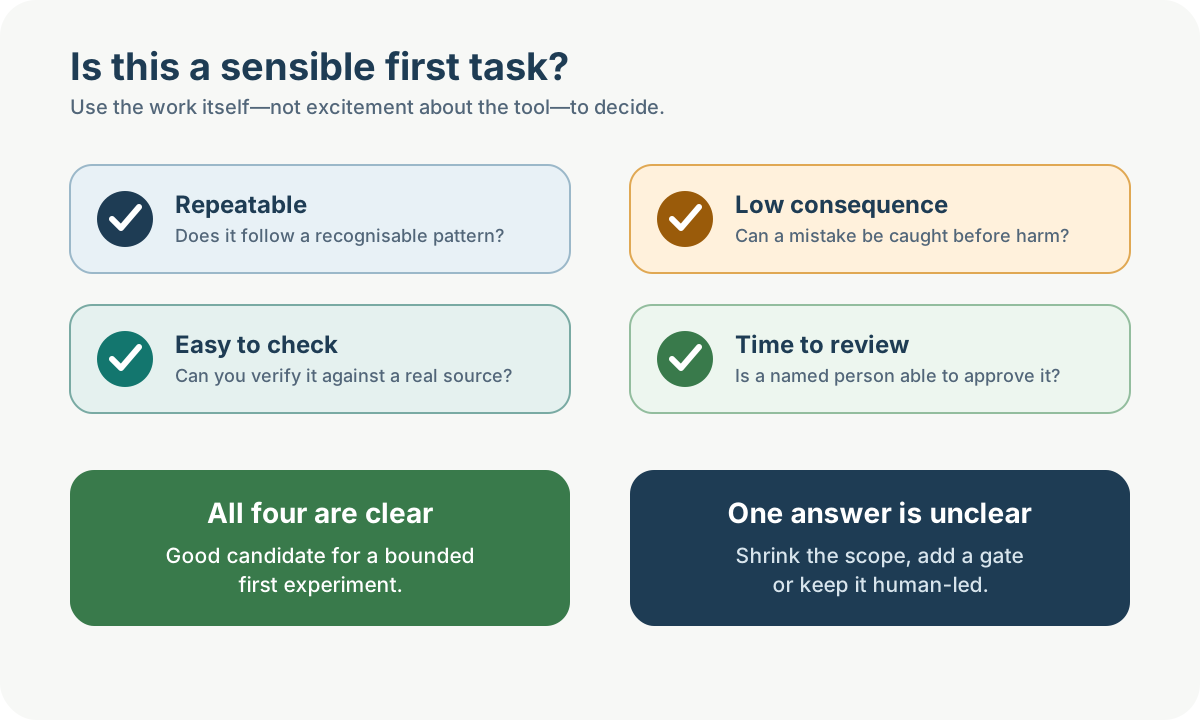
If one answer is unclear, shrink the task, add a named review gate or leave it human-led.
A good first task
A useful candidate is:
- repeated often enough that you can compare several cases;
- based on approved, available source material;
- low-consequence if a draft is wrong;
- easy for a competent person to verify;
- reversible before anything is sent or changed; and
- still worth doing if the final answer is “AI does not help”.
A poor first task
Do not casually experiment with decisions about employment, health, credit, legal rights, safeguarding, physical safety or other people's access to essential services.
Also avoid a task where the only “test” is whether the output sounds good. Fluency is not accuracy.
Measure the old method before the new one
Use three to five representative examples. Record:
- hands-on time;
- waiting time if it matters;
- corrections and rework;
- where information is found;
- who reviews and approves;
- common failure points; and
- data that must not leave an approved system.
Do not invent a saving because the AI produced words quickly. Drafting is one part of the work. Finding sources, prompting, checking, correcting and gaining approval count too.
Week 2 output
Finish with one selected task, a small test set and a written before-state.
Week 3: test the task where it can actually fail
This is the week most AI demos quietly skip.
A polished example proves that the tool worked once on the example somebody chose to show you. It says very little about your Monday morning.
If this is the part you are stuck on, use the seven-case guide for testing whether an AI demo will work again.
Build a small test set that includes:
- An ordinary case. The kind you see most weeks.
- An awkward case. Missing information, unusual wording or an exception.
- A contradictory case. Two sources disagree.
- A boundary case. The right behaviour is to stop and ask a person.
- A hostile case where relevant. An input that tries to override the rules or smuggle in an unsafe action.
For each case, keep the source, output and correction record together. If the output makes a factual claim, verify it against the source rather than asking the same model whether it was right.
The NIST Generative AI Profile describes confidently false output, often called hallucination, as a normal risk of generative systems, not a rare software bug that has been permanently fixed. Your test should assume a plausible-looking mistake will eventually appear.
Protect the data before testing the clever bit
Use an account and tool your organisation approves. Confirm what the service stores, which processors and connectors receive the data, what administrators can audit and whether prompts or responses are retained.
“Not used to train models” does not answer every privacy or retention question.
For Microsoft 365 Copilot specifically, Microsoft says it works within the signed-in user's existing access. That protection is valuable, but it also means bad or over-broad permissions can be reflected in what Copilot can retrieve. Microsoft also says generated responses are not guaranteed to be fully factual and should be reviewed before sharing.
If you cannot use real work data safely, use synthetic or public material and mark that limitation in the result. A synthetic test can teach you about the workflow. It cannot prove production readiness.
Week 3 output
Finish with a result log: what passed, what failed, what you corrected, what you withheld and which cases still require a person.
Week 4: decide what survives
You are not writing a success story. You are making a work decision.
Classify the experiment:
Keep
The method helped on representative cases, the review step is clear, the remaining risk is understood and somebody is named as owner.
Change
There is value, but the input, instructions, data access, output format, checks or task boundary need work. Write down exactly what changes before the next test.
Stop
The output is too unreliable, the checking effort removes the benefit, the data route is not acceptable, the task changes too much each time, or the consequence of error is too high.
“Stop” is not a failed month. It may be the most valuable decision you make before somebody builds automation around a bad assumption.
Count the whole job
Compare the new method with the baseline using the same measures. Include:
- preparation and prompting;
- generation time;
- checking and correction;
- approval;
- failed runs;
- work moved to somebody else; and
- new risk or support burden.
A method that saves you fifteen minutes but creates thirty minutes of checking for a colleague is not a team saving.
Week 4 output
Create a one-page record with:
- task and owner;
- tool and account type;
- allowed inputs and prohibited data;
- old method and baseline;
- AI assistance boundary;
- test cases;
- observed results, including failures;
- required human check;
- status: Keep, Change or Stop; and
- next review date.
What should I show my manager?
Do not lead with the model name or your best prompt. Lead with the problem and the evidence.
You can say:
“I tested AI assistance on one recurring task using five representative cases. Here is the old method, the boundary I set, the corrections it needed and the part I kept human-owned. The result is [Keep / Change / Stop]. Before we use it again, I need your agreement on the owner, approved data and review step.”
That is a better conversation than “look what ChatGPT did”. It gives your manager something to question.
If you need to turn the experiment into promotion-quality evidence, use the visible-evidence guide.
How do I make the result repeatable?
A useful method should not depend on you sitting beside the next person and filling in everything you forgot to write down.
The plain-English definition of a dependable AI workflow separates the prompt from the trigger, sources, checks, exceptions and owner around it.
The prompt is only one part. A repeatable task also needs:
- a clear trigger;
- approved inputs and sources;
- examples of acceptable output;
- privacy and action boundaries;
- checks against the original material;
- stop-and-ask rules;
- a record of normal and failure tests; and
- a named person who approves the result.
If you already have a suitable task and want guided help assembling that evidence, build one visible example with the Build My First Repeatable AI Workflow Board.
The Board is a paid, guided route. It helps you document and test one recurring workflow and decide whether it should remain in chat, become a shared assistant or be considered for approval-gated automation. It does not promise a promotion, productivity gain or job safety. You may finish by deciding not to delegate the task.
If the shape is the decision you are trying to make, compare chat, a custom assistant and approval-gated automation before adding another tool.
What should I avoid during these 30 days?
- Do not upload work data because a consumer chat box is convenient.
- Do not choose a high-consequence decision as your beginner project.
- Do not count generation time and ignore review time.
- Do not test only the example you know will work.
- Do not call a draft “automation”.
- Do not make yourself the permanent unpaid checker for everybody else.
- If you plan to share the result, set the workflow owner and support boundary first.
- Do not present an occupation score as a forecast about you.
- Do not buy five tools before one task has earned a second test.
Thirty days will not settle the future of your career. It can leave you with something better than another anxious month: one question answered by your own evidence.
Sources and attribution
- Microsoft Support: Decide when Copilot or an agent is the right tool for your work.
- Microsoft Learn: Data, privacy and security for Microsoft 365 Copilot.
- NIST AI Risk Management Framework and NIST AI 600-1: Generative Artificial Intelligence Profile.
- International Labour Organization: Generative AI and Jobs, a Refined Global Index of Occupational Exposure, ILO Working Paper 140, 2025.
- Collab365 Futureproof method and release 2026-q4.1, licensed CC BY 4.0 with its upstream data attribution published in the release.