
We sell a guided learning Board inside Collab365 Spaces called Build a Microsoft 365 LMS with AI.
That sentence probably creates three questions at once. What is a Space? What is a Board? Are we claiming to sell a finished LMS?
Fair questions. Here is the short version.
What Collab365 Spaces is
A Collab365 Space is a focused help hub for a role or workplace problem. It keeps the relevant problems, quick updates, briefings, guided work, Blueprints and Boards together.
The idea is simple. You should not have to search one giant content library every time work changes. Start with the problem in front of you, then use the kind of help that fits it.
In this case, the problem is not merely how to draw four screens in Power Apps. It is how to use AI to help build an LMS prototype while keeping the decisions, testing and evidence under human control.
What a Board is
A Collab365 Board is a guided learning route through the useful material. It is not a Kanban board and it is not another LMS.
It can pull a small number of items from one or more Spaces and arrange them around one outcome. An Official Board is a route Collab365 has assembled for a common workplace problem, so the person following it gets a sequence rather than a pile of links.
The paid learning Board behind this article is Build a Microsoft 365 LMS with AI. It is for a Microsoft 365 or Power Platform maker who wants AI to help build a prototype without giving AI the steering wheel.
What the learning Board contains
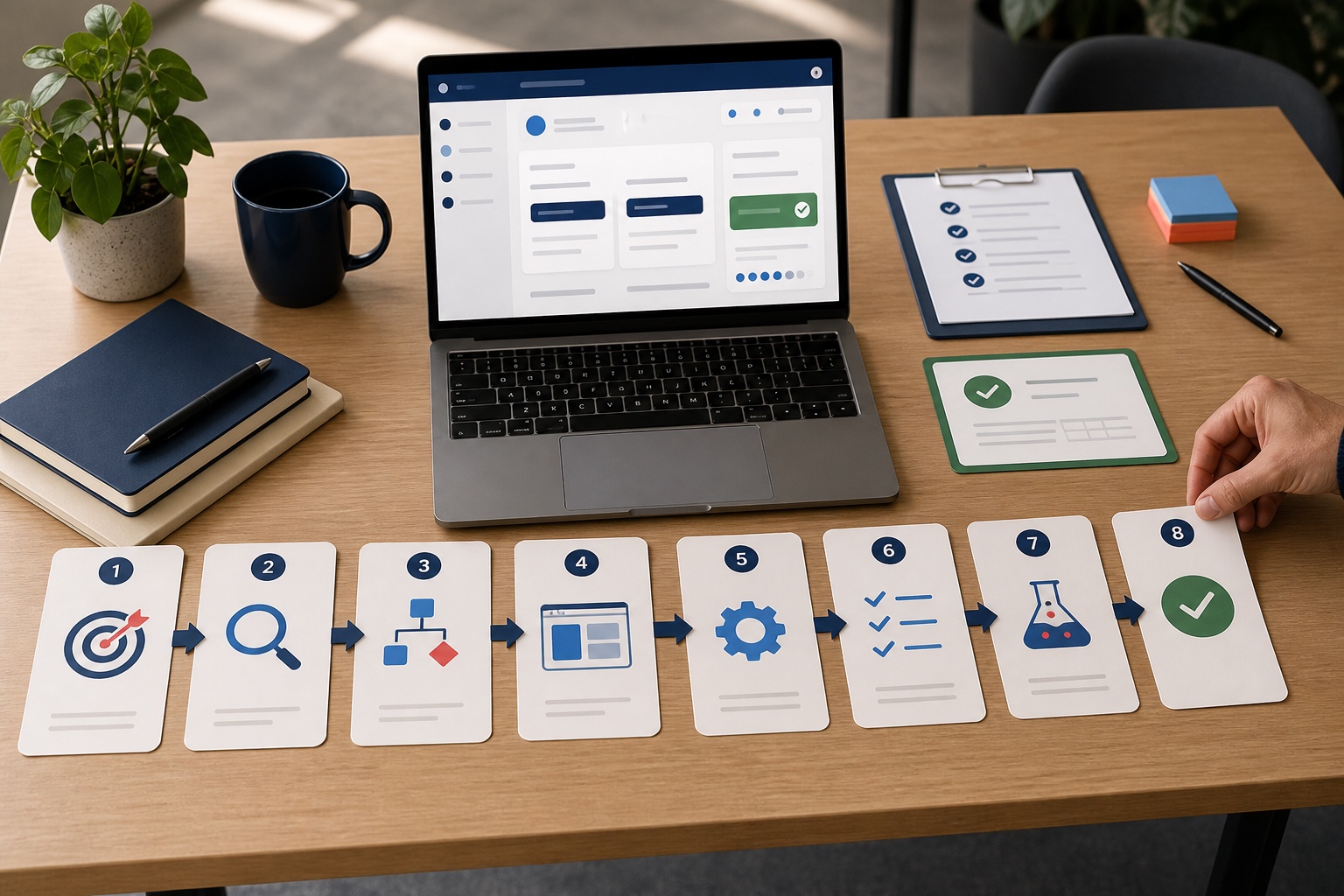
The Board joins eight pieces of work into one build-and-prove route:
- Check the Dataverse environment before AI changes anything.
- Contain AI-made changes so a useful edit does not become an accidental rebuild.
- Inspect what changed before approving an AI-generated page.
- Use the main Blueprint to build a fictional LMS prototype with AI coaching.
- Test the app before another person gets the link.
- Decide what a completion record actually proves.
- Move the solution to a second environment and check it again.
- Document the app so another person can understand and support it.
Some items explain a decision or a common failure. The Blueprint carries the practical build context, prompts, steps and checks. The longer guided items deal with testing, moving the solution and handing it over.
The promised outcome is not an installed LMS for your organisation. It is a fictional prototype and a body of evidence that should help a maker decide what has actually been proved.
Why we built the prototype ourselves
We did not want the Board to ask people to build something we had only described on a sales page.
So we tested its central build idea in Power Apps. We worked on a real four-screen canvas app, used fictional Dataverse data, fixed one real permission failure, and inspected the learner and evidence journey.
We did not complete every Board outcome. The app remained unpublished. We did not prove the proposed six-table schema, the move to a second environment, the release record or the handover pack.
This article shows what the exercise produced, what the screenshots prove, and where the evidence stops.
The prototype in one minute
The worked prototype is a saved Power Apps canvas app called LMS Build Lab in Studio. It is backed by fictional Dataverse records. The name belongs to the sample app, not to the learning Board.
The observed app has four screens:
- Course Setup, where the maker can load and inspect a published course version.
- Learner Home, where Lina Learner sees the assigned course and overall progress.
- Lesson, where a learner sees course context, lesson position, an objective, a practical check, and saved completion.
- My Evidence, where the app brings the required lessons and whole-course evidence together.
The fixture is deliberately small:
- Course: Close the Northstar Workshop Safely
- Course version: SAFE_SHIFT_V1
- Release label: 1.0
- Learner: Lina Learner
- Required lessons: 2
- Completed lessons: 2
- Whole-course evidence: EVD_LINA_SAFE_SHIFT_V1
Every name and record is fictional. The small size is a feature. We wanted to see the whole evidence path without dragging real learner data into an unfinished build.
What the maker can see
The Course Setup screen loads a published course version and the two required lessons.
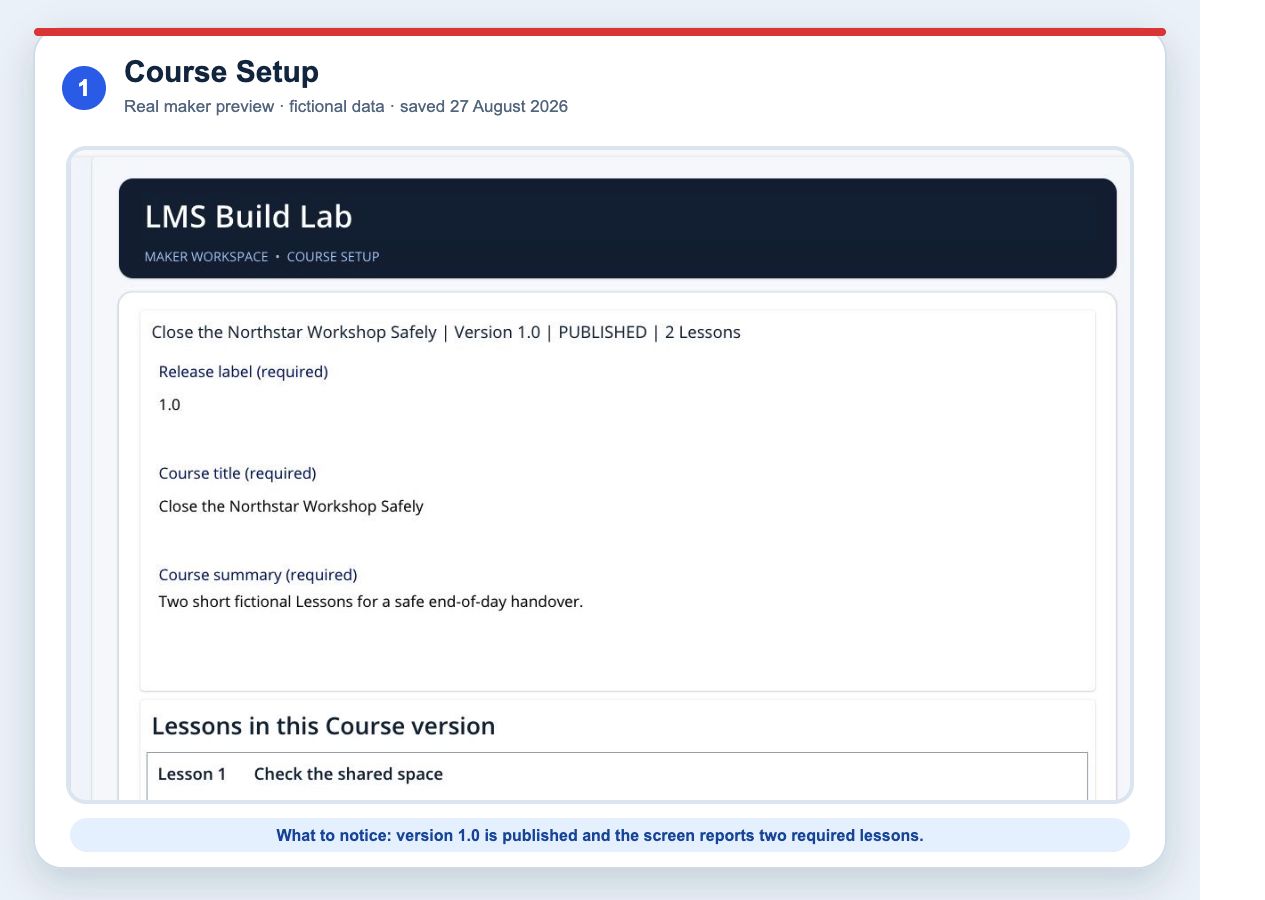
This screenshot proves that the maker preview rendered those fixture values on 27 August 2026.
It does not prove the wider Board promise of a verified six-table schema. We have not included that claim because the current article source pack does not contain independently checked schema evidence.
That may sound fussy. It is the useful sort of fussiness. A screen showing two lessons is not a database inspection.
What the learner can see
The Learner Home screen identifies the fictional learner, course, enrolment status, setup status, and two-of-two progress.
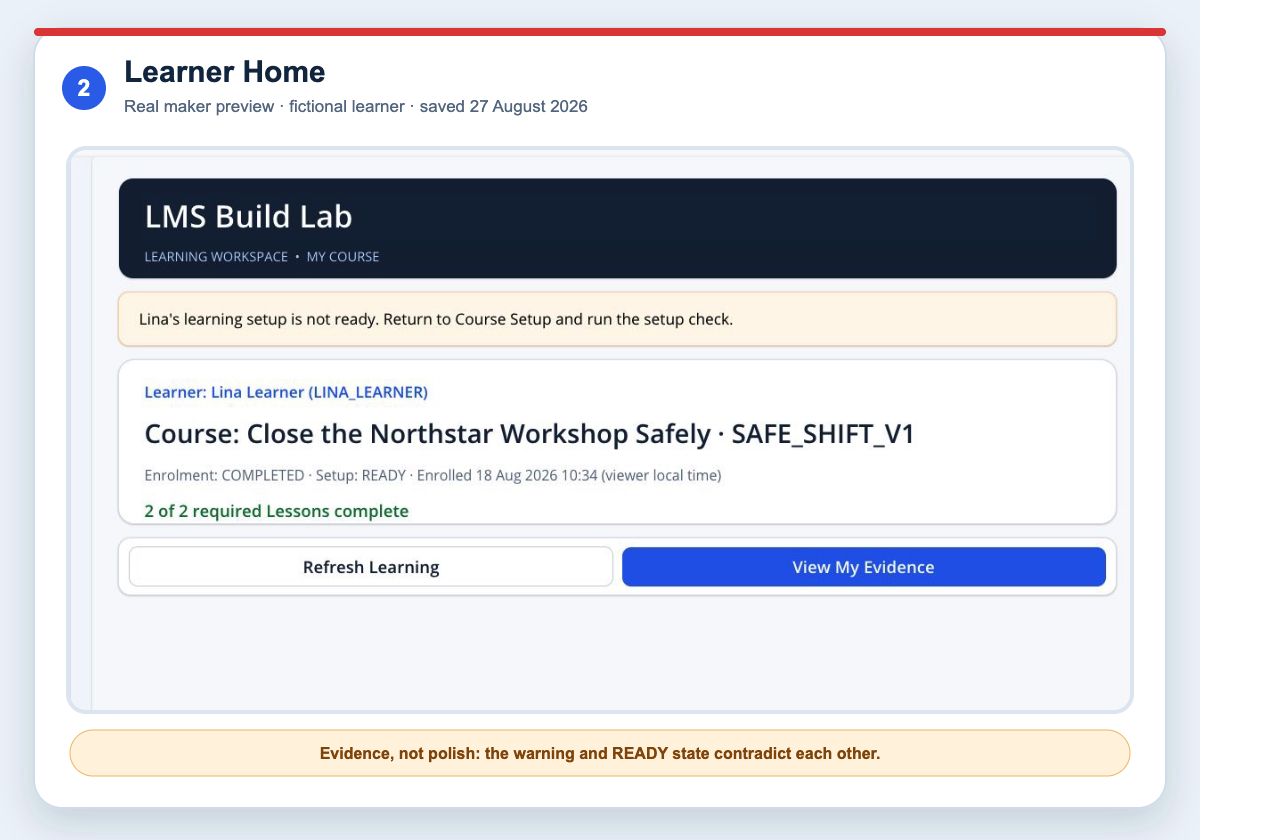
You may notice a contradictory warning above the ready status. The warning says the learning setup is not ready, while the detail card says Setup: READY.
We have left that contradiction visible in the screenshot because it is real.
It tells us that the state and message logic need another pass. Hiding it would make the article prettier and the evidence worse.
The rest of the learner summary is useful:
- the learner is explicit;
- the course version code is visible;
- enrolment and completion are separate;
- the overall count says what is complete.
Those details give a colleague something concrete to question.
A lesson needed to feel like a lesson
The first version technically showed a title, one sentence, progress, and three buttons. It worked as a wireframe. It did not give a learner much sense of where they were or what they were expected to do.
We changed the screen to show:
- course context;
- lesson 2 of 2;
- the lesson type;
- a learning objective;
- a three-step practical check;
- a saved completion message;
- clearer course-home, refresh, and completed actions.
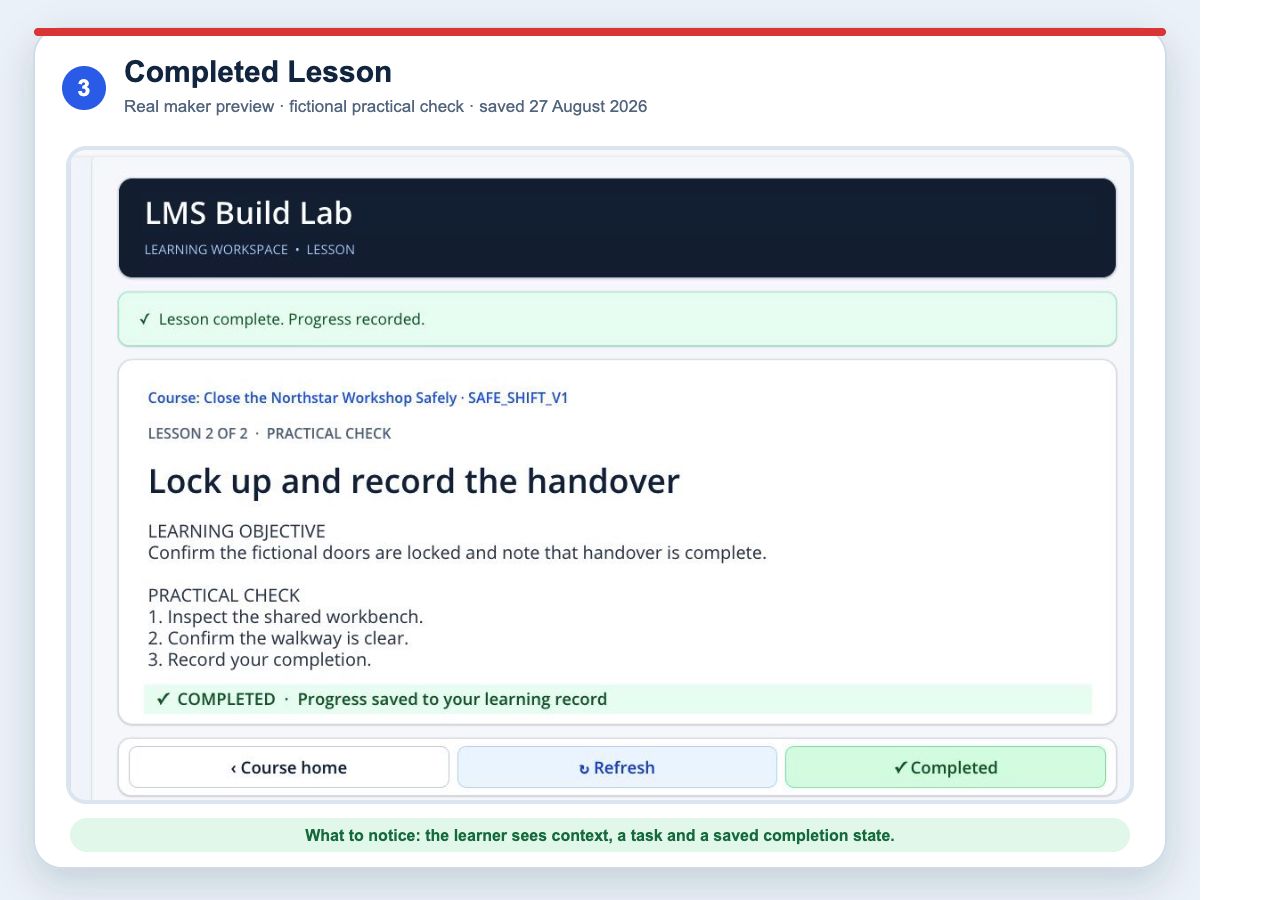
This is a better course screen. It is still a fictional practical check, not safety training. No one should infer instructional quality, policy approval, or workplace competence from it.
The permission failure was more useful than a perfect demo
At one point, the app reported that the Course read had failed.
The data existed.
The signed-in account was an administrator at a broader platform level, but it did not yet have the necessary Dataverse security role in that environment. Once the role was assigned, the Course read worked.
Microsoft’s Dataverse guidance explains the platform mechanism. Tenant-level administrator roles do not automatically provide Dataverse data access. Dataverse uses security roles and privileges inside the environment.
This was a specific diagnosis for this prototype. A Course read can fail for other reasons, including a broken connection, an incorrect query, missing records, an environment mismatch, or a service issue.
The lesson is not “every error is permissions”.
The lesson is “do not translate every failed read into ‘the course is missing’”.
Read the four-gate Dataverse diagnostic.
What the evidence record proves
The My Evidence screen displays:
- the learner;
- the course version;
- enrolment status and completion time;
- each required lesson;
- each lesson’s completion status and time;
- a distinct whole-course evidence code;
- a course-version snapshot;
- the count of completed required lessons.
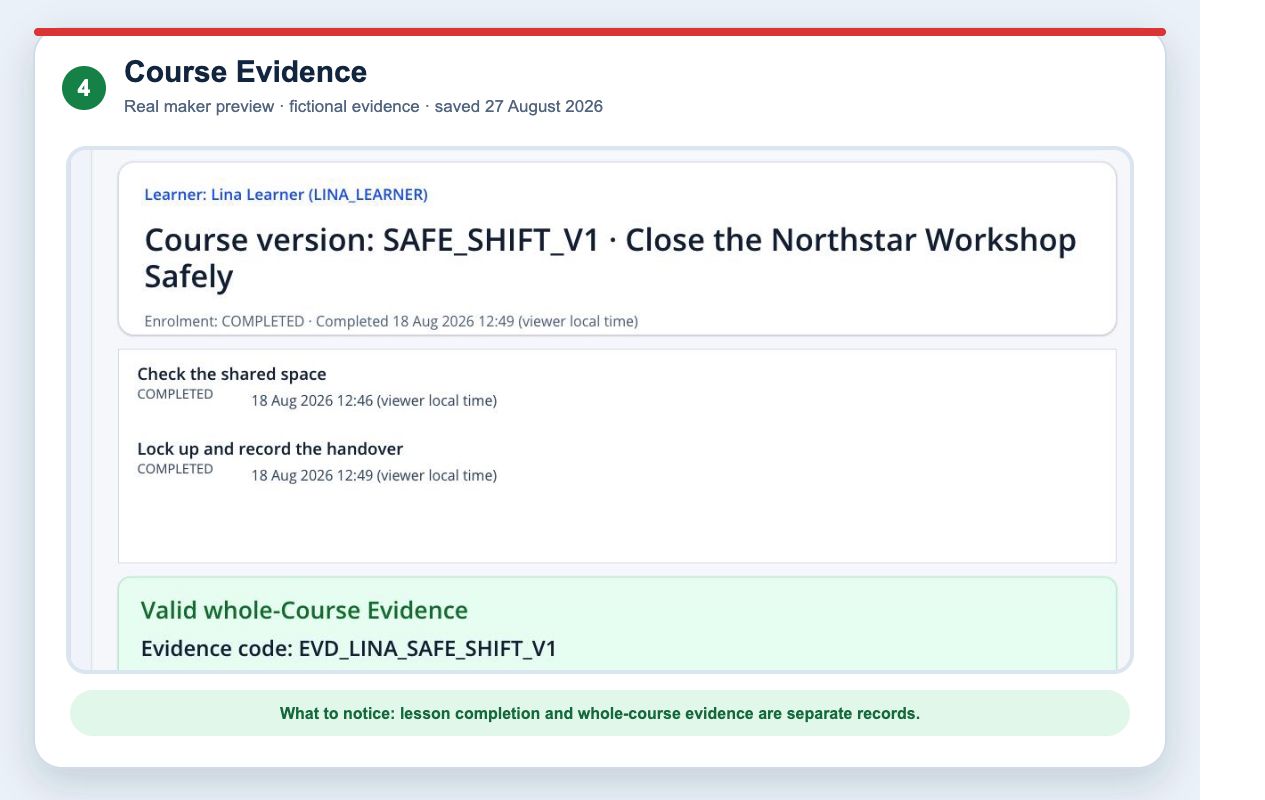
This is stronger than colouring the Course card green.
It lets a reviewer see the chain:
- Which version was assigned?
- Which lessons were required?
- Which learner completed them?
- When was each lesson completed?
- What rule produced the course-level result?
- Which record preserves that result?
It still does not prove identity assurance, whether someone genuinely performed the fictional task, whether a manager approved it, whether records are retained correctly, or whether the evidence can survive a version change.
Your Power Apps LMS Says 100% Complete. What Did They Actually Finish? goes deeper into that boundary.
What we checked
The maker session provided the following current evidence:
| Check | Observed result | Honest interpretation |
|---|---|---|
| Course data read | Passed after Dataverse role correction | The current account could read the fixture in this environment |
| Learner journey | Two fictional lessons shown complete | The preview can render the completed fixture |
| Whole-course evidence | Separate evidence record displayed | The prototype represents course evidence separately from lesson progress |
| Formula issues in App Checker | No issue count shown | No current Formula issue count was visible in that check |
| Accessibility issues in App Checker | No issue count shown | No current Accessibility issue count was visible in that check |
| Performance advisories | 10 remained | Performance work is not complete |
| Save state | Saved in Studio | The maker draft was saved |
| Publish state | Not published | No published colleague journey has been proved |
App Checker is useful. It is not a certification badge.
A zero issue count in one category does not prove that the app is accessible to every user, secure, fast under realistic data, or fit for production. Microsoft now directs new Power Platform test automation towards its Playwright samples. That still does not replace manual checks or inspection of the records the app writes.
What remains unproved
These items are outside the current proof:
- a verified six-table schema;
- a completed Release Check Record;
- a published app tested by a non-maker;
- a test in a second environment;
- managed solution import and configuration;
- a dated Handover Pack;
- a cold-reader handover check;
- the Board's final completion evidence;
- production support, recovery, monitoring, and retention;
- real learner outcomes;
- compliance, regulatory, or certification suitability.
This list is not an apology. It is the next-work list.
The most expensive mistakes happen when “we have not tested that yet” is quietly edited out of the story.
What AI did, and what it did not do
AI helped us work on a real canvas app through a controlled authoring route. The generated and edited app still had to be inspected in Power Apps Studio, run against the Dataverse fixture, diagnosed, and visually reviewed.
Microsoft currently labels its external AI code-generation workflow for canvas apps as preview. The documentation says the tools can generate and validate Power Apps YAML and sync it through a live coauthoring session. Microsoft also leaves the maker responsible for reviewing, testing, and checking the result against organisational standards.
If you are used to asking AI questions but not letting it work with files and browser tools, AI for Work explains that jump. The guide is about briefing an agent, supervising the work, and checking the result rather than trusting a polished answer.
That matches our experience.
AI could change the interface quickly. It could not look at an awkward status banner and feel that the story was wrong. It could not decide whether the evidence claim was sufficient for a real organisation. It could not turn a saved preview into a production release.
The decision this prototype supports
The prototype is useful enough to support a more informed conversation:
- Is this learning workflow distinctive enough to keep building?
- Would a packaged LMS already solve it?
- Which data and permission questions need a real owner?
- What does the organisation mean by completion?
- What must be tested before another person gets the link?
- What would a second-environment and handover check need to contain?
That is a good prototype outcome.
If you are still choosing the route, read Should You Build an LMS on Microsoft Power Platform?.
If you want to build the same fictional prototype and produce your own evidence, follow the paid Build a Microsoft 365 LMS with AI learning Board.
The Board is a guided build-and-prove learning route. It does not install, certify, or promise a production LMS.
Sources
- Microsoft Learn: Create and edit canvas apps with AI code generation tools, preview
- Microsoft Learn: Role-based security roles for Dataverse
- Microsoft Learn: Share a canvas app with your organisation
- Microsoft Learn: Deprecation of Power Apps Test Engine
- Microsoft Learn: Power Platform Playwright samples
- Microsoft Learn: Create responsive layouts in canvas apps
- Microsoft Learn: ALM for a new Power Platform project