Chat Was Just the Demo
If you are still copying AI answers into your own documents, you are doing the work yourself. Here is the shift that changes everything: AI that finishes the job.

It is twenty to ten on a Tuesday night and you are still at the laptop, doing a job you cannot even name.
ChatGPT is open in one tab. The spreadsheet is in the second. The report you owe your boss tomorrow is in the third.
You paste numbers in. It explains them beautifully. You copy the explanation out, fix the formatting that broke on the way over, and change “utilize” to “utilise” because it has forgotten you are British again.
Then the next chunk. Paste, copy, fix. Paste, copy, fix.
None of this is what your job is supposed to be. Your job is the judgement: what the numbers mean, what to recommend, what to leave out. Tonight, your job is transport.
Here is the question this whole guide hangs on: if the AI is so clever, why are you the one still typing at ten o'clock?
You are the hands
By any normal measure you are good with AI. You use it most days: drafts, ideas, awkward emails made polite.
This chapter is not about getting better at that. It is about noticing what every one of those sessions has in common.
It can tell you how to sort a folder. It cannot sort the folder. It can draft a flawless email. It cannot file, format or finish anything.
So every task makes the same round trip. You fetch the raw material and carry it in. The AI does some thinking. Then you carry the result back out and do the assembling, the formatting, the saving and the sending yourself.
I call it the copy-paste tax. The thinking got faster. The doing is still entirely yours.
That is not a flaw in you, and it is not a flaw in your prompts. It is the design of a chat window: it can only ever hand you words, so you have to be the hands.
For years, that was the whole deal, and we all assumed it was what “using AI” meant. Then, very recently, the deal changed.
Chat, it turns out, was just the demo.
The invoice pile, run twice
Let me make that concrete with a job you will recognise.
Say you have 38 supplier invoices sitting in a folder as PDFs, and finance wants one spreadsheet out of them: every invoice listed with its supplier, date and amount, plus a total for each supplier.
Here is that job done twice.
Run one: the chat version
You open your chat AI and attach the first few PDFs. You ask for the supplier, date and amount from each.
It reads them perfectly and gives you a tidy list. In the chat window.
Now the ferrying starts. You copy the list into Excel. You attach the next batch and copy again. You fix the date column that pasted in the wrong format, and retype the amount that landed in the wrong cell.
And that is the good version. On a worse night the chat loses track of what you told it three batches ago, and you start a fresh conversation and explain the whole job again.
Forty minutes later you have your spreadsheet, and you check the totals with a calculator because you no longer trust your own pasting.
Notice who built the file. You did. The AI never saw your folder, never opened a spreadsheet, never checked a single total. It answered questions. You did the job.
And nothing went wrong here, by the way. This is chat working exactly as designed. It is simply the ceiling.
Run two: the agent version
Now the same job, handed over instead of asked about.
The software that can take it has a name you will keep meeting: an agent. Strip the jargon away and it means one thing: software that can use your computer to finish a task you describe.
Not advise you on the task. Finish it.
You point the agent at that one folder and you type a brief. A brief is exactly what it sounds like: the short written instruction you would give a person, saying what done looks like.
Then you go and put the kettle on.
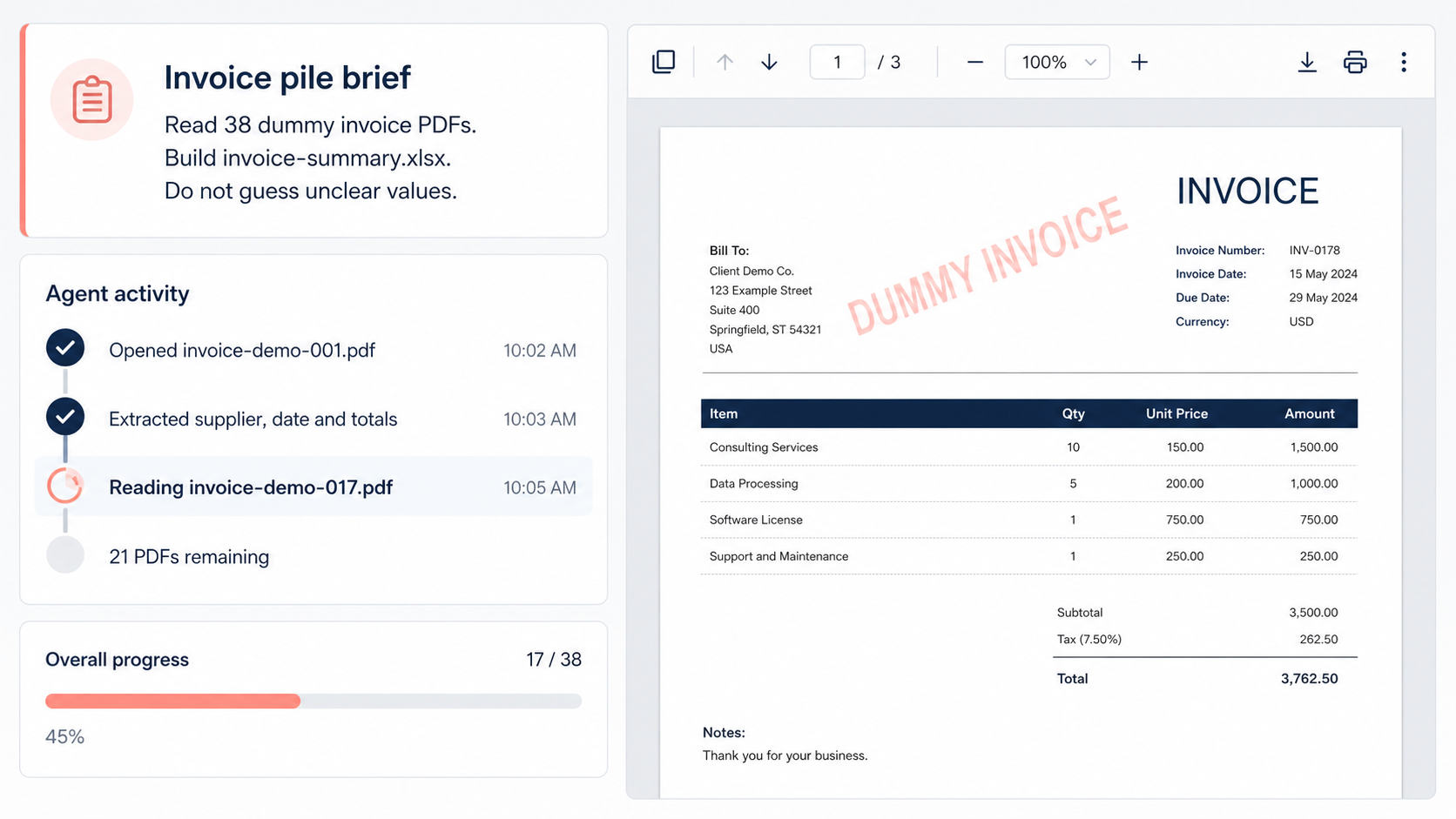
The agent opens each PDF itself. It builds the spreadsheet itself. It adds up the totals itself, and then it does something a chat window has never once done for you: it checks its own result before handing it over.
What comes back is the finished file, plus a short report of what it did: how many invoices it read, which ones it could not read cleanly, and anything it deliberately left for you to decide.
That report matters enough that this guide gives it a name: the receipt. The receipt is how you check the work without redoing the work.
Read the run back. Opened, read, built, added, checked. Every verb in that list used to be yours.
One more thing happened in that run, and it is the part people fear until they see it. Before the agent touched anything, it asked. It requested access to that one folder and worked nowhere else, so you stayed the one holding the keys. Chapter 6 walks through those safety rails properly.

The one-question test
You do not need to memorise any vocabulary to keep chat and agents straight. You need one question, and it will correctly sort every AI product you meet for years.
Who does the typing?
If you are copying, pasting, reformatting and saving, you are chatting. The AI advised. You worked.
If the software opened the files, made the thing and handed it back finished with a receipt, you delegated. That word, delegated, names the skill this guide actually teaches.
Try the test on your own week. The presentation you asked for tips on, then built yourself: chat. The meeting notes you had summarised, then pasted into the minutes by hand: chat. Genuinely useful, all of it. And every bit left you doing the typing.
The only test you need. If the answer is still you, that is chat: helpful, but the work remains yours.
| Chat | An agent | |
|---|---|---|
| Who does the typing | You do | It does |
| What comes back | Advice, in a chat window | The finished file, plus a receipt |
| How a task starts | You open a tab and paste bits in | You hand it a folder and a brief |
| While the work happens | You ferry between windows | You do something better |
| Checking the result | You proofread as you go | It checks itself; you review the receipt |
| Your role | The hands | The manager |
Here is a clear reconstruction of what the right-hand column looks like partway through the invoice job.
You are not late
At this point a familiar, slightly sick feeling can arrive. Everyone else clearly knows about this already. This is another wave you somehow missed while you were busy doing actual work.
So let me put real dates on this category, because they are the most reassuring facts in the whole guide.
- 12 January 2026. Claude Cowork launches on Mac: Anthropic's desktop agent, built for people who do not code. The Windows version follows in February.
- 22 April 2026. Agent Mode in Word, Excel and PowerPoint goes GA (generally available: Microsoft's term for finished testing and switched on). Copilot stops just suggesting and starts editing the file itself.
- 9 July 2026. ChatGPT Work launches: OpenAI's agent for producing finished documents, spreadsheets, presentations and reports while you watch, or while you walk away.
There were earlier experiments, built for enthusiasts. OpenAI ran a tool called Operator from January 2025 and an early agent mode from that summer. But the versions aimed at ordinary office workers, with the safety rails and the sensible packaging, all arrived in 2026.
Count it on your fingers. The oldest mainstream tool in this category launched in January. It is August.
The age of this category in August 2026, counting from Claude Cowork's January launch. You have not missed years of progress. There were no years.
Be as suspicious of hype as you like; you have earned it. But suspicious people check dates, and these dates say something unusual: for once, nobody is selling you a mature product late. You are standing near the start.
You are early, and cheaply early at that. All three of those tools sit inside plans costing roughly $20 a month, plans you or your employer may already pay for. Chapter 8 maps the options properly.
One honest thing
Agents fail. They misread briefs. They make wrong assumptions. Now and then one states a wrong number with total confidence, which is exactly as dangerous as it sounds.
That is why the invoice brief above says “do not guess”. It is why receipts exist. And it is why chapter 7 of this guide is entirely about catching failures in about sixty seconds.
Delegation without checking is not a productivity system. It is how horror stories happen. We will teach the checking alongside everything else.
What the rest of this guide does
Chapter 2 shows what agents can genuinely do today, across files, documents, research and spreadsheets, and is honest about what they are still bad at.
Chapter 3 gives you the working model: every agent has eyes, hands, permissions and a loop. Once you can see those four parts, every product on the market becomes readable.
Chapter 4 is the one that matters. Your first delegated task, tonight, in about fifteen minutes, on a copy of a folder so nothing real is ever at risk.
After that: how to brief like a manager, how to stay safe, what to do when it goes wrong, and which tool is yours. Later on we give four tools the same invoice job and publish the receipts, deviations and stumbles included.
Read the chapters in order if you can, because each one leans on the one before. But if you only ever do one thing, do chapter 4.
Underneath all of it sits the real subject, and it is not technology. It is delegation: briefing, supervising, reviewing. Think of an agent as a brilliant assistant on their first day. Knows everything in general, knows nothing about your business, needs a clear brief, deserves checking.
Which brings us to the worry underneath the worry, the one nobody says out loud in team meetings: is this thing coming for my job?
The honest answer: AI is already changing what your job is, and pretending otherwise helps nobody. But look at which part of Tuesday night it takes. The pasting, the ferrying, the reformatting. The parts that were beneath you anyway.
What stays valuable is the person who can decide what needs doing, describe it clearly, and judge whether it came back right. Nobody is asking you to out-type a machine. You are being promoted to its manager.
And if you are tired of being told to upskill: fair. This is not a plea to learn to code. There is no code anywhere in this guide. It is closer to learning how to work with a very fast, very literal new starter.
Before you move on, one five-minute exercise. It makes everything above land in your hands instead of your head. Paste the text below into the AI you already use: ChatGPT, Claude, Copilot or Gemini.