Same Task, Four Tools
We gave four AI tools the same invoice job: turn 38 PDFs into one spreadsheet. Here is exactly what came back, deviations and stumbles included.

Somewhere in your bookmarks there is an article called something like “The 10 Best AI Tools for 2026”. Star ratings. A feature grid. An affiliate link under every heading.
Here is the quiet problem with nearly all of them: nothing on the page proves the writer ever gave a single one of those tools a real piece of work.
This chapter is the opposite. One office task, the kind that actually eats an afternoon. One canonical brief. Four tools, each asked to produce the same result from the same 38 synthetic invoices.
And one promise before we start: every result on this page comes from a real run, with the stumbles left in. Where a workbook still needs an independent check, or is no longer available to check, the scorecard says so rather than pretending. Nothing here is invented, and nothing will be.
The rules of the test
The task is the invoice pile from chapter 1. Say you have 38 supplier invoice PDFs sitting in a folder, and someone needs them turned into one clean spreadsheet: a row per invoice, plus a total per supplier. Real work. Fiddly, dull, and expensive to get wrong.
The target is a word-for-word run of the brief below. If a tool cannot start until the location wording changes, that deviation counts as part of its result. It is printed, and the run is not described as a clean like-for-like comparison.
Every run happens on a fresh copy of the same folder. That is the copy-first rail from chapter 6: the agent (software that can use your computer to finish a task you describe) can do what it likes with the copies, because the originals never meet an AI.
Five things get recorded for every run. Together they form the run log: the same five measurements, taken the same way, for every tool.
- Setup friction. Minutes from opening the tool to the run actually starting.
- Time to done. Timer starts when the brief is sent, stops when the files exist.
- Questions asked. Every time the tool stops to check something with me.
- Spot-check. Three invoices, always including the largest, compared line by line against the spreadsheet.
- The blunt one. Would I pass this on to another human without reviewing it?
One habit from earlier chapters matters most here. Watch who does the typing. After the brief, I do not coach the extraction. If a tool stops for a permission or scope decision, that interruption is counted and the answer stays in the receipt.
The brief below is the control. Any tool that needs different location wording, an extra permission or a folder substitution has that change printed beside its result.
The brief, in full
This is the canonical text for the test. It answers the five questions from chapter 5: the outcome, the inputs, the constraints, what done means, and when to come and ask.
Run the exact same invoice pile
You can repeat this test with the same inputs. Download the Chapter 9 benchmark pack (v1.0.0). It contains only the 38 synthetic invoice PDFs: fictional suppliers, fictional numbers and no customer data. Extract the ZIP so the folder is still called “Invoices copy”, then paste the brief above without changing it.
Keep the answer key away from the tool until its run is finished. Then download the ground-truth CSV and compare every row. The release notes and SHA-256 checksums are published alongside it.
Why the brief looks like this
Two lines do the heaviest lifting. “Do not guess” exists because of chapter 7: when an agent gets something wrong, it gets it wrong confidently, and numbers are where that stings. A blank cell with a line in the report is annoying. A plausible invented total is dangerous.
“Ask me before you touch anything outside this folder” is this task's addition to the standing rule from chapter 5: “Ask me before you delete, send or spend. When unsure, stop and ask.” It turns the scariest failure modes into questions instead of surprises.
And the column list is the anti-disappointment tool. Every tool below gets judged against what the brief actually asked for, not against my mood on the day.
A note on fairness
These four tools do not sit in the same place. Chapter 8 mapped that: some work from a local workspace, some run on a remote computer, and one lives in a browser.
Some of them were never designed to touch a local folder at all. That is deliberate. Part of what this test measures is what a tool does when the task does not quite fit its shape: adapt, route around, or say no.
One exception is marked rather than hidden. Grok Bot received a OneDrive-specific version of the task, then needed approval to substitute a different folder name. Its workbook still tests the extraction job, but that run is not a clean word-for-word comparison with the canonical brief above.
For the cloud tools (the ones that do the work on the vendor's computers rather than yours), the same 38 PDFs get uploaded instead of read in place. The difference in route is recorded, not hidden.
Cursor Agent
Cursor is the deliberate outsider in this test. It is a coding agent, built to work inside a project rather than tidy up somebody's invoice pile.
But its Agent can search a chosen workspace, read and edit files, and run terminal commands. For this run, the copied invoice folder becomes the workspace and the brief stays exactly as printed above.
That makes it a useful test, not a stunt. Can strong local-file and terminal tools carry a developer product through an ordinary office job? It only counts as finished if it returns the real two-sheet .xlsx, not a script, a set of instructions or a table in chat.
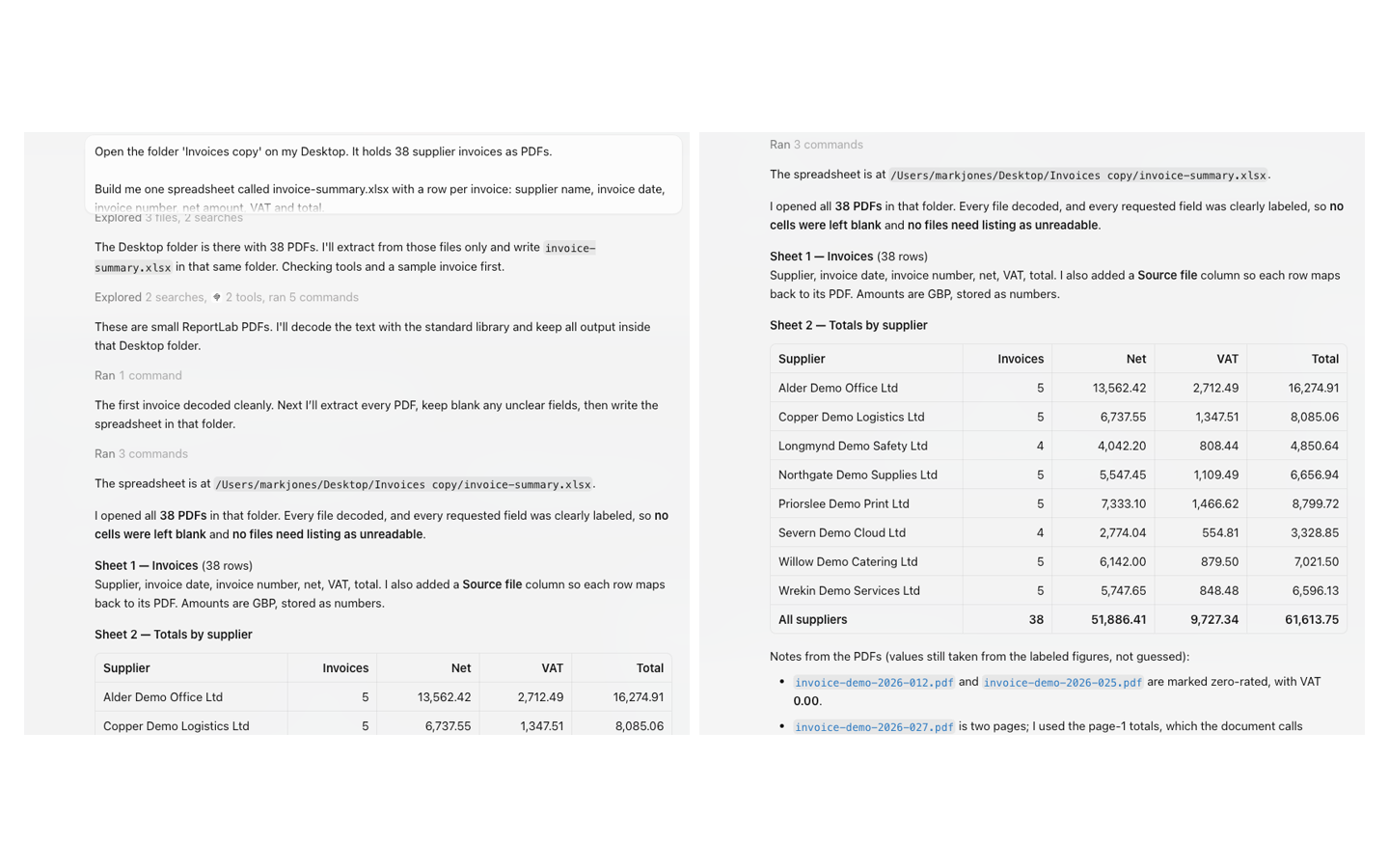
Cursor found the 38 PDFs on the Desktop, sampled one, decoded the full set and wrote invoice-summary.xlsx back into the same folder. The captured run shows no follow-up question. Its receipt reported 38 invoice rows, a source-file column, eight supplier totals and no blanks or unreadable files.
This one has now had more than a three-row spot-check. I compared every field in all 38 workbook rows with the published answer key. All 38 file names and invoice numbers were unique. Every supplier, date, invoice number, net amount, VAT amount and total matched. The eight supplier summaries and the £61,613.75 grand total matched too.
The workbook is correct but plain. It has the requested two sheets and readable numeric and date columns, but its totals are stored as values rather than formulas. No elapsed time is visible in the receipt, so that score remains unrecorded rather than guessed.
ChatGPT Work
ChatGPT Work is OpenAI's agent, launched in July 2026 as the successor to its earlier Operator experiments. It lives inside ChatGPT and is included from the Plus plan at $20 a month. The free tier does not get it.
It is built for exactly this shape of job: long, multi-step tasks that end in a finished deliverable, spreadsheets included. You watch its progress as it works, and it stops to ask approval before sensitive actions.
The structural difference from Cowork is that ChatGPT Work is cloud-run. The work happens on OpenAI's computers, not yours, so the 38 PDFs get uploaded to the task rather than read in place. Same brief, different journey for your files, and worth knowing if your invoices are sensitive.
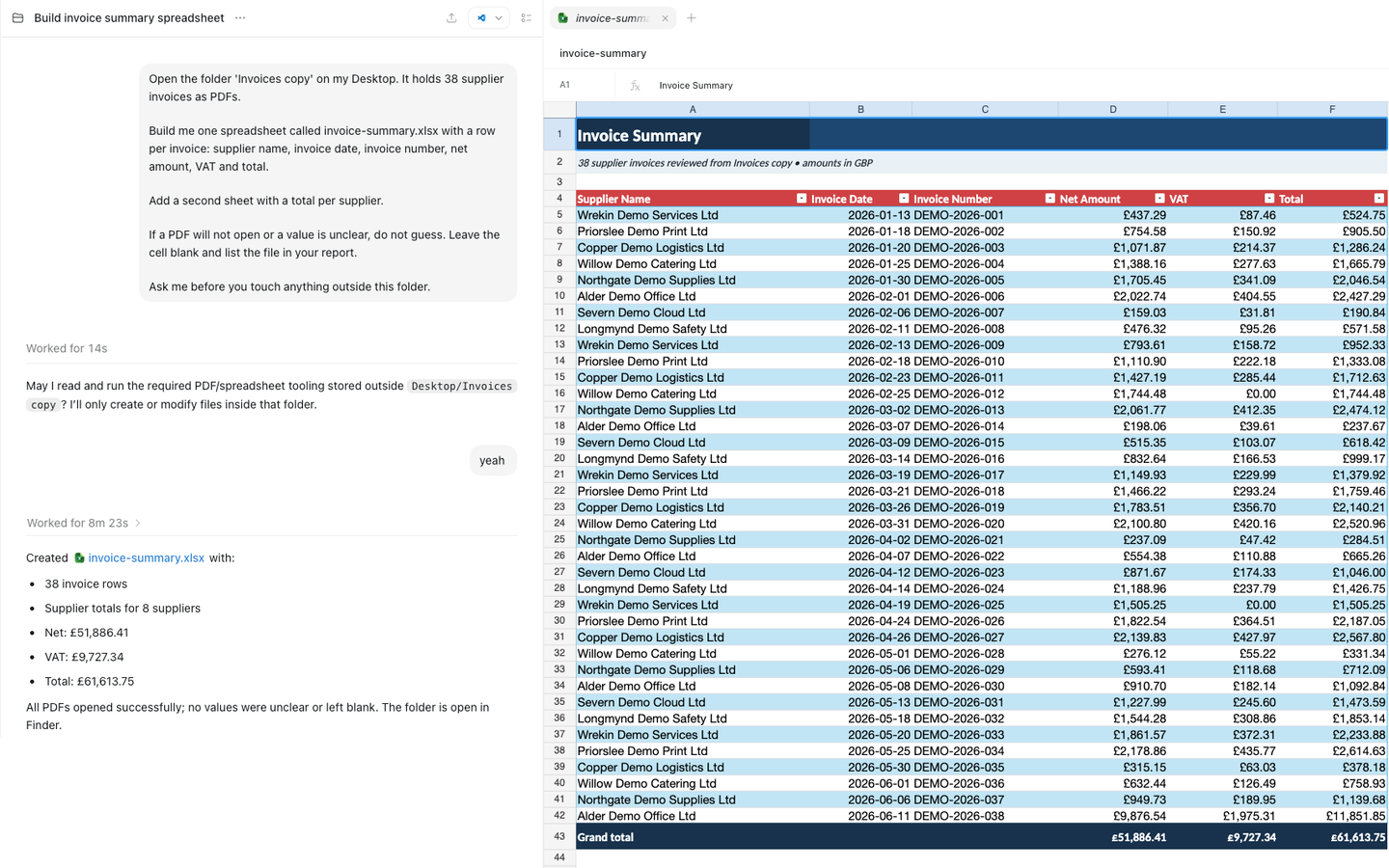
The live run paused after 14 seconds for one bounded permission: could it use the PDF and spreadsheet tooling it needed while keeping every created or modified file inside the invoice folder? After approval, it finished in 8 minutes 23 seconds. Its receipt reported 38 invoice rows, totals for eight suppliers, net of £51,886.41, VAT of £9,727.34 and a grand total of £61,613.75. It also said every PDF opened and no value was left blank.
The timing and totals belong in the scorecard. A row-by-row accuracy verdict does not. The original ChatGPT workbook was not preserved as a separate file before a later run wrote another invoice-summary.xlsx into the same folder. The screenshot shows a polished table, but without the original workbook I cannot check its 38 rows or formulas. That missing evidence stays visible rather than being turned into a score.
Claude Cowork
Cowork is Anthropic's desktop agent, aimed squarely at people who do not code. It arrived in January 2026 (chapter 8 has the full map) and is included in the Claude Pro plan at $20 a month.
On paper, this task is its home turf. Cowork works inside folders you choose, so the setup should be exactly three moves: point it at the invoice folder, paste the brief, watch.
It can also open a browser for web tasks and run jobs unattended on a schedule. This task needs none of that. What matters here is the folder, the PDFs, and the receipt it leaves behind.
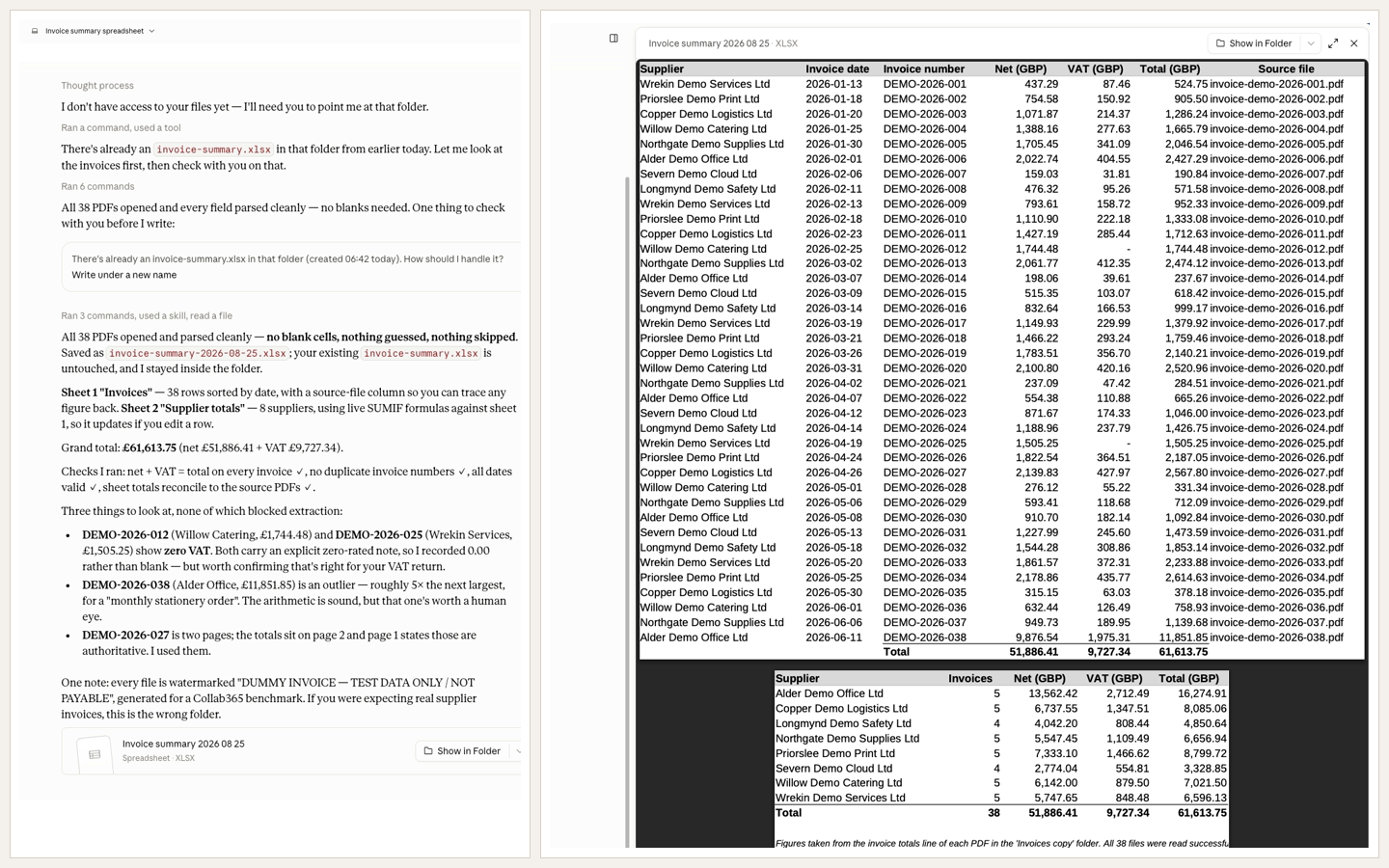
The first useful moment was a stop, not an answer. Cowork found the invoice-summary.xlsx left by the earlier ChatGPT run and asked how it should handle the existing file. I chose “Write under a new name”. It saved invoice-summary-2026-08-25.xlsx, said it left the original untouched, and stayed inside the folder.
Its receipt reported 38 invoice rows, totals for eight suppliers using live SUMIF formulas, and a grand total of £61,613.75: £51,886.41 net plus £9,727.34 VAT. The workbook visibly includes a source-file column, so every row has a route back to its PDF.
More usefully, Cowork said what it had checked and what still deserved a human eye. It reported no duplicate invoice numbers, valid dates and totals that reconciled to the source PDFs. Then it surfaced two zero-VAT invoices, an £11,851.85 outlier and a two-page invoice whose authoritative totals were on page two.
I then checked the saved workbook against the published answer key. All 38 rows matched across source file, supplier, date, invoice number, net, VAT and total. All eight supplier summaries and the £61,613.75 grand total matched. The workbook had 39 working formula cells, including its live supplier summaries, and no formula errors. That is a passed benchmark after review, not permission to send future invoice work onward without checking it.
Grok Bot
This is Grok Bot, not an ordinary chat with Grok. It launched in early beta on 11 August 2026 as a set of agents with their own computers, able to work across apps and keep going after you step away.
It is also a practical inclusion for Cursor users. As of 21 August, the official release notes say Grok Bot is included with SuperGrok Plus, Cursor Pro+ and all Cursor Teams plans. That puts a general work agent next to Cursor's coding agent without pretending they are the same product.
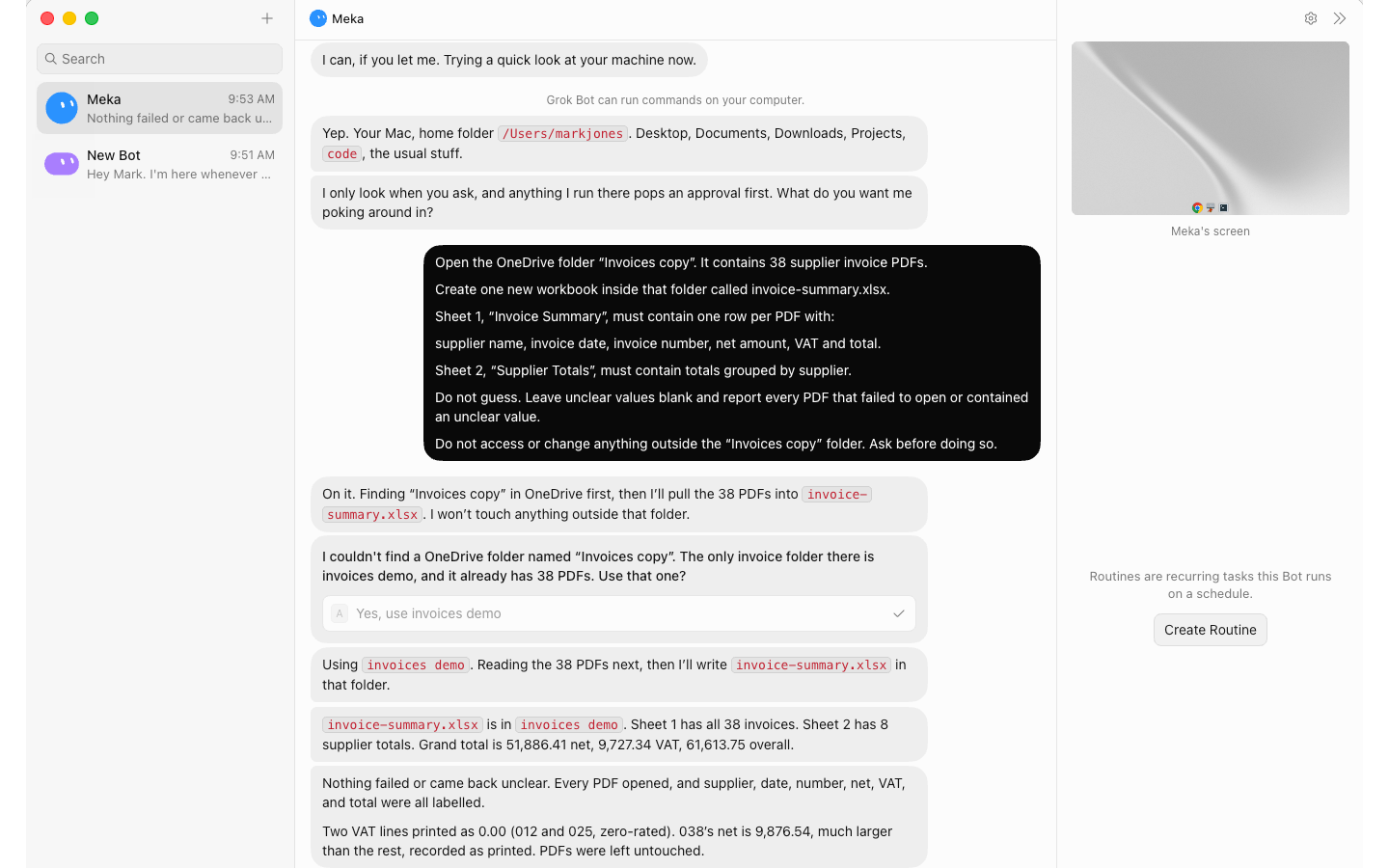
In this run, the Bot said it could use Mark's Mac, named the home folder and said anything it ran would require approval. The task prompt pointed it to OneDrive rather than the Desktop, so this was already a location-adapted version of the benchmark.
It could not find the requested “Invoices copy” folder. It found “invoices demo” instead, confirmed that the folder already held 38 PDFs, and stopped for a decision. Mark approved that substitution. That is one question and one re-brief, kept in the result rather than edited out.
Grok then created invoice-summary.xlsx with 38 invoice rows and eight supplier totals. Its receipt reported £51,886.41 net, £9,727.34 VAT and £61,613.75 overall, with no unreadable or unclear files. It also called out the two zero-VAT invoices and the large final invoice. No elapsed time was visible, so none is claimed here.
The workbook itself passed the independent check. All 38 rows matched the answer key across filename, supplier, date, invoice number, net, VAT and total. All eight supplier totals matched, there were no blanks, and the grand total reconciled exactly. The format is readable but plain, and the totals are static values rather than formulas.
The results, side by side
One table, no star ratings. Every cell is filled from the runs above, and only from the runs above.
| Cursor Agent | ChatGPT Work | Claude Cowork | Grok Bot | |
|---|---|---|---|---|
| Setup friction | Not timed | Not timed; 1 permission stop | Not timed; 1 overwrite stop | Not timed; 1 folder stop |
| Minutes to done | Not captured | 8m 23s | Not captured | Not captured |
| Questions it asked | 0 visible | 1 | 1 | 1 |
| Spot-check accuracy | 38/38 rows exact | Not checked; workbook unavailable | 38/38 rows exact | 38/38 rows exact |
| Format quality | Correct, plain, static totals | Polished preview; formulas unchecked | Correct, readable, live formulas | Correct, plain, static totals |
| Re-brief needed? | No | No; permission only | No; filename decision only | Yes; folder substitution |
| Trust it unreviewed? | No; checked here and passed | No; workbook unavailable | No; checked here and passed | No; checked here and passed |
What this proves, and what it does not
Be careful what you carry away from this chapter. It is one task, run on one day, by one person. That is a data point, not a verdict.
What it can prove: that the same office job lands very differently depending on where a tool sits and what it is allowed to touch. That a run log can be kept for office AI the same way test results are kept for cars and washing machines. And whatever specifics the runs above show, stumbles included.
What it cannot prove: which tool is best. A different task could reorder everything. The competitor scan from chapter 2 rewards browsing where this task rewards file handling. Run that instead and you would likely get a different table.
One promise about the spot-check. If the review pass catches a real error, it stays in this chapter with the tool's name next to it. If it catches nothing, the chapter will say that too. No invented gotchas, and no invented perfection.
There is no winner declared here, on purpose. Different tools have different traits, and the most this page will ever claim is a lean: which tool suited which kind of reader, based on what its run log showed.
The honest lean from this run is narrow. Claude Cowork produced the most reviewable office handoff: exact rows, live formulas and useful exception notes. Cursor and Grok Bot also produced exact workbooks, but both were plainer and used static totals. ChatGPT Work was the only run with a captured completion time and its visible workbook looked polished, but the missing original means it cannot share the accuracy verdict. That is an evidence gap, not evidence that its result was wrong.
And a shelf-life warning. Every date in this chapter comes from 2026 itself: Cowork shipped in January, ChatGPT Work arrived in July, and Grok Bot joined the field in August. Tools moving that fast make comparison pages rot.
That is why the table above carries its checked date. Past a few months old, read every cell as history, not advice.
The part that does not rot is the method. Canonical brief, deviations logged, timed run, counted questions, checked numbers, trust verdict. That is not a review technique. It is a management technique, and it works on every tool on the map, including the ones nobody has built yet.