What AI Can Actually Do For You Now
Sorting 400 files. Turning 38 invoice PDFs into one clean spreadsheet. Researching 12 competitors into a two-page note. All real, all today, none of it needs code.

Somewhere in last week there was an afternoon that did not deserve you.
Maybe it was the ninety minutes you spent copying figures out of PDF attachments into a spreadsheet, one alt-tab at a time. Maybe it was renaming a folder of scans so anyone could ever find them again. Maybe it was reading twelve near-identical websites to answer one question from your boss.
You did it well. That is not the point. The point is that none of it needed your judgement. It needed your hands, your attention and a chunk of your life.
So here is the exercise this whole chapter is built on. Think back over last week and list everything you did that a smart temp could have done, if you had written clear instructions for them.
Not the meetings. Not the decisions. Not the conversation you had to word carefully. The sorting, retyping, reformatting, looking-things-up work.
That list is probably longer than you would like. This chapter is a guided tour of it.
First, a thirty-second recap
If you have landed here from a search rather than from chapter 1, one definition. An AI agent is software that takes the task you describe and gets it done on your computer, rather than telling you how.
In chat, you ask and it explains, then you do the work. An agent opens the files, uses a browser when it needs one, produces the finished document and hands it back with a written report of what it did. This guide calls that report the receipt, and you will learn to read one fast.
The test from chapter 1 carries everything that follows: who does the typing? Every task in this gallery passes it. You describe. It types.
One honesty note before the tour. Agents get things wrong, sometimes confidently, and chapter 7 is entirely about catching them at it. Nothing below is magic; all of it gets checked.
The rule behind every task in this chapter: if you could write instructions clear enough for a smart temp on their first day, an agent can probably take it off your desk.
The gallery: nine tasks, five kinds of busywork
Office busywork comes in five kinds: your files, your documents, research, the web and your spreadsheets. The nine tasks below cover all five. For each, you will see what you would say, what the agent does, and what lands back on your desk.
What you say is called the brief: office English for the instructions you hand over, exactly as you would brief a person. Chapter 5 teaches you to write a good one. For now, notice how ordinary they sound.
Each task also carries a risk colour, an idea we use for the rest of the guide. Green means easy to undo and safe to try today. Amber means it touches real files or produces numbers or text someone will act on, so you review the result before it goes anywhere.
And one safety rail, stated plainly because it matters: until you have read chapter 6, agents work on copies. Copy the folder, hand over the copy. The worst possible outcome becomes a messy duplicate you delete.
Your files
Start with the drudgery everyone recognises.
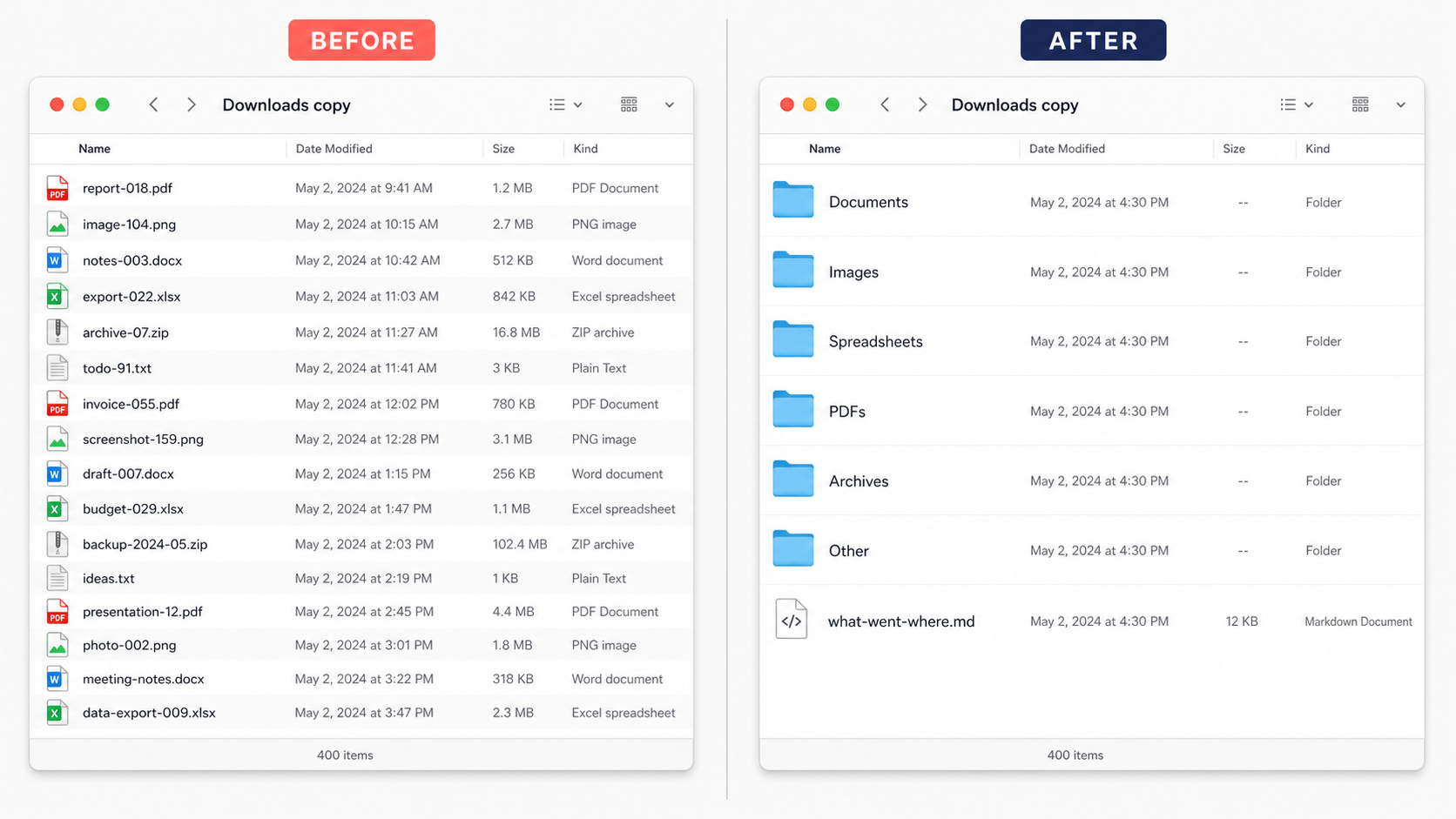
1. Sort a messy folder. Say you have a Downloads folder with 400 files in it: invoices next to holiday photos next to seven files all named some version of final_v2. You say: “Sort this folder into subfolders by file type and month, and give me a report of what went where.”
The agent reads the names and dates, builds the folder structure, moves everything, then writes the receipt. You get a tidy folder and a one-page summary you can skim. Green, because you ran it on a copy.
2. Rename files to a pattern. Say you have 200 scans named IMG_4471 upwards. “Rename each file to date, client, document type, based on what you find inside it. List anything you could not identify.”
It opens each file, reads enough to know what it is, renames it and flags the strays. You get a folder you can actually search, plus a short exceptions list for a human eye. Green on a copy, and notice the shape: it handles the 190 obvious ones, you handle the ten odd ones.
3. Extract data trapped in PDFs. This is the invoice pile from chapter 1. Say you have 38 supplier invoices as PDFs and month-end looming. “Go through every PDF in this folder. Pull the supplier, date, invoice number and total into one spreadsheet, with a totals row at the bottom.”
You get the finished spreadsheet, and the two hours of retyping stay yours. This one is amber: numbers are exactly where an agent's rare mistakes sting, so you spot-check a handful of rows against the PDFs before anyone acts on the file. Chapter 7 turns that check into a sixty-second habit.

Your documents
The second family lives inside Word, Google Docs and their cousins.
4. Draft from sources. Say you have six sets of meeting notes and a project update due. “Draft a two-page project update from the six files in this folder, matching the tone and layout of last month's update, which I have attached.”
Hiding in that sentence is the strongest briefing trick in this guide: give an example. “Match this file” does more work than a paragraph of description.
You get a first draft built from your own material, not the internet's. Editing it beats staring at a blank page, every time. Green: it created a new file and touched nothing else.
5. Merge documents into one. Say four colleagues each wrote their section of a proposal, in four styles, in four files. “Combine these four drafts into one document. Standardise the headings and formatting, and flag anywhere the drafts contradict each other.”
The flag part matters. You are asking to be told, not letting it decide. You get one coherent file plus a short list of clashes that only a human should settle. Green, you review it.
6. Reformat to a house template. The report is written but it is in the wrong template, and the fiddly hour of restyling is staring at you. “Rework this report into the attached template. Change layout only, not wording. If anything will not fit, ask me rather than cutting it.”
You get the hour back. And that closing line, ask me rather than deciding, is a rail you will use everywhere. Green.
Research and the web
7. The competitor scan. Say your boss asks, on a Friday afternoon of course, what your twelve competitors are doing about pricing. By hand that is a lost day of open tabs and half-finished notes.
Here is the brief in full, because this is one of the four tasks the guide keeps coming back to.
The agent opens a browser and reads the sites much as you would, then writes the note. You get two pages instead of twelve tabs, with sources you can click to verify. Green, because it only reads: the “do not sign in” line keeps it that way.
8. Gathering from the web. The same skill scales sideways. Say you need published pricing and contact details for 20 potential suppliers pulled into one list, a job that normally eats an evening.
This one is amber for a specific reason: the web is where confident nonsense creeps in. Sites go stale and agents occasionally misread a page, so before the list feeds any decision, you verify the rows that matter against the source links it gives you.
Agents can also work forms: the expense claim you submit every month, the supplier form that wants the same nine fields every time. The standing rule that keeps this sane is simple. It fills in, you press submit. Say it in the brief: “Fill everything in, then stop and show me before anything is sent.”
Your spreadsheets
9. Clean, combine, summarise. Say three systems each export a monthly report, and every month someone stitches them together by hand. “Merge these three exports into one sheet. Remove duplicate rows, fix the mixed date formats, and add a summary tab by month and by client.”
You get the stitched, summarised file plus a receipt listing exactly what it removed and changed. Amber, same reason as the invoices: totals get spot-checked before they reach anyone who acts on them.
Now notice what you never said in any of these nine briefs: how to do the task. No steps, no menus, no formulas. You described the outcome and the agent found the route, which is precisely what makes this delegation rather than a cleverer kind of typing.
| What you'd say | Time it costs you by hand | Risk | |
|---|---|---|---|
| Sort a messy folder | “Sort this folder by type and month, report what went where.” | An hour of dragging | Green, on a copy |
| Rename 200 files | “Rename to date, client, type. List anything unclear.” | A mind-numbing afternoon | Green, on a copy |
| Extract data from PDFs | “Pull supplier, date and total from every PDF into one sheet.” | Two hours of retyping | Amber, check the numbers |
| Draft from sources | “Draft a two-page update from these notes, match last month's.” | Half a day of blank page | Green, you review it |
| Merge four drafts | “Combine into one document, flag the contradictions.” | A morning of formatting | Green, you review it |
| Reformat to a template | “Rework into this template. Layout only. Ask before cutting.” | An hour of fiddling | Green, you review it |
| Competitor scan | “Read these 12 sites, write a two-page note with sources.” | A day you never find | Green, it only reads |
| Gather from the web | “Collect pricing and contacts for these 20 firms into a list.” | An evening of tabs | Amber, verify before use |
| Clean and combine sheets | “Merge three exports, dedupe, fix dates, add a summary tab.” | Two hours and a headache | Amber, spot-check totals |
Four tasks you will meet again
This guide keeps returning to the same four scenarios, on purpose. Watching one task handled better and better as your skills grow teaches more than a parade of fresh examples ever could.
- The messy Downloads folder. 400 mixed files. This becomes your first real delegation in chapter 4, on a copy, tonight if you like.
- The invoice pile. 38 PDFs into one spreadsheet with totals. In chapter 9 we hand the identical brief to five different tools and publish exactly what each sent back, stumbles included.
- The competitor scan. Twelve sites into a two-page note. It returns in chapter 5, where you will see a vague brief and a sharp brief produce unrecognisably different results.
- The Monday report. The weekly status document that eventually writes itself on a schedule. That is chapter 11, and we climb to it slowly, one earned rung at a time.
Keep your own versions of these in mind as you read. The gallery is mine. Your list is the one that matters, and you will write it at the end of this chapter.
What agents are still bad at
Now the honest half of the chapter. The tasks above are real capabilities; the Downloads picture is an illustrative reconstruction. This list is real too, and pretending otherwise is how people end up burned once and back to doing everything by hand forever.
Judgement calls. An agent can assemble everything you need to decide whether to drop a supplier: the spend history, the incident log, the contract terms, laid out in one tidy briefing. It cannot own the decision. Choices with consequences need a person attached to them, and that is not a temporary limitation to be patched next quarter. It is the job.
Office politics. It has never sat in your meetings. It does not know that two departments are barely speaking, or that a certain phrase will detonate on a certain reader. It can produce a neutral first draft of the awkward email; only you know how the words will land, and on whom.
Anything you cannot describe. “Sort out the project mess” goes nowhere, because there is no brief inside it to follow. If you cannot say what the finished result looks like, neither can the agent. The fix is honest and slightly annoying: do the task once yourself, write down what you actually did, then delegate the second run.
Tasks where one wrong number is catastrophic. Payroll. A customer's bill. A regulatory filing. Agents make occasional confident errors, and numbers are precisely where those hide.
These tasks are not banned. They are review-heavy: the agent does the first pass, and every figure gets checked by a human against the source before anything is sent. If you do not have time for the check, you do not have time for the shortcut.
Agents take the assembling, sorting, drafting and gathering. Deciding, and answering for the decision, is the part of your job that was never busywork in the first place.
| Why it stays with you | What you can still hand over | |
|---|---|---|
| The judgement call | Someone has to own the decision and its fallout | The briefing pack: options, evidence, pros and cons |
| Office politics | It cannot read a room it has never been in | A neutral first draft of the awkward message, for you to tune |
| The task you can't describe | No brief means nothing to follow | Nothing yet. Do it once, take notes, delegate the second run |
| The one-wrong-number task | A single wrong figure costs real money or trust | The first pass, with every number human-checked against source |
Which points at the honest answer to the worry underneath this whole subject. Look at what is on each side of the line.
The tasks agents take are the ones that were beneath you anyway: the retyping, the renaming, the tab-herding. What stays is judgement, relationships and the calls only you can make. Hand over the first pile and you win back the hours you need to sharpen the second.
Next chapter we open an agent up and look at its four working parts, in plain office English, so none of this feels like magic. But first there is a list with your name on it.